


That feeling when your clinic hits 85 patients per week and suddenly everything feels held together with duct tape? The scheduling system that worked fine at 40 patients now creates double-bookings. Your billing workflow that handled $30k monthly starts dropping claims when you cross $60k. The documentation process you built for yourself falls apart when you add a second chiropractor.
This isn't a staffing problem or a software problem. It's what happens when clinics try to scale without mapping their core operational systems first.
The Four Systems That Determine Whether Growth Breaks You
Most chiropractic clinics run on hope until they hit their breaking point. Usually happens somewhere between adding the second provider or crossing 100 weekly visits. The owner starts working 65-hour weeks just to maintain basic operations while patient satisfaction drops and staff turnover spikes.
The difference between clinics that scale smoothly and those that implode comes down to four interconnected systems. Not isolated fixes or random automations, but actual operational frameworks that grow with volume.
Scheduling Architecture Beyond Basic Calendar Management
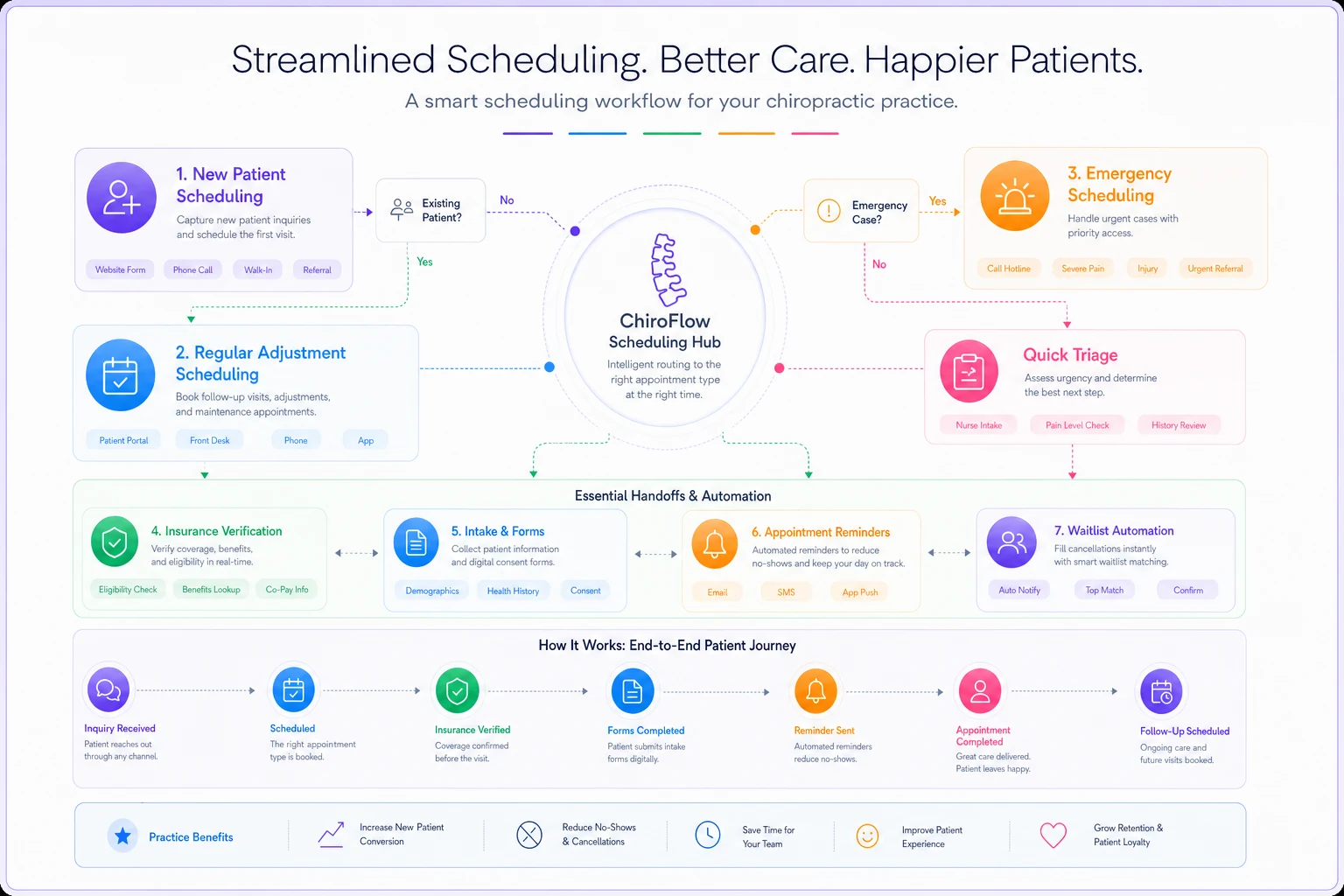
Your scheduling system is really three different workflows pretending to be one. There's new patient scheduling, which needs insurance verification, intake forms, and extra time blocks. Regular adjustment scheduling that needs to balance provider capacity with patient preferences. Then emergency or acute scheduling that disrupts everything else.
At 40 patients weekly, you can manage this mentally. Your front desk knows Mrs. Johnson prefers Tuesday mornings and that Dr. Smith needs 15-minute blocks while you prefer 10-minute slots. But at 80 patients weekly, the mental system breaks down completely.
Double bookings increase. No-shows spike because confirmation calls get missed. Provider utilization drops even though demand increases. You're adding more appointment slots but somehow seeing fewer patients effectively.
The clinics that scale build scheduling SOPs around decision trees, not memory. When someone calls, there's a documented flow: insurance patient goes through verification first, cash patient gets immediate booking, Medicare requires specific slot types. Each path has clear steps, time requirements, and handoff points.
But the SOP itself matters less than the triggers that tell you when to adjust it. Track your scheduling accuracy rate - appointments that happen as originally booked without changes. When it drops below 85%, something's breaking. Maybe your buffer time between appointments is too tight. Maybe your new patient slots are scattered randomly instead of grouped for efficiency.
The automation layer comes last, not first. Once your process is solid, you automate the repetitive parts. Appointment reminders based on patient history - some need 24-hour reminders, others need morning-of. Insurance verification that runs automatically when appointments are booked. Waitlist management that fills cancellations without manual intervention.
Here's a quick visual reference to help align scheduling decision points with handoffs and automation triggers.
Staffing Systems That Prevent The Owner-Dependency Trap
Every growing clinic faces the same staffing paradox. You need coverage for growth, but can't afford full staffing until after you've grown. Most owners solve this by working themselves into exhaustion, covering every gap personally.
The clinics that scale reliably build staffing systems around workload distribution, not just headcount. They map every operational task to skill levels. Insurance verification? That's a Level 2 task that any trained admin can handle. Treatment planning? Level 4, requires clinical knowledge. Patient education about care plans? Level 3, needs someone who understands treatment but isn't necessarily licensed.
| Trigger | Action |
|---|---|
| When Level 2 tasks exceed 30 hours weekly | you need another admin. |
| When clinical documentation hits 15 hours weekly | you need a scribe or documentation support. |
This mapping lets you flex staffing without breaking operations. Your massage therapist can handle Level 3 tasks during slow treatment hours. Your senior front desk can train into Level 2 billing tasks. Your office manager can cover Level 1 tasks when someone calls out.
More importantly, it tells you exactly when to hire. Not when you feel overwhelmed, but when specific task volumes exceed capacity thresholds.
The KPI that matters isn't staff-to-patient ratio. It's task completion rate by level. When Level 3 tasks start backing up, patient education suffers and retention drops. When Level 2 tasks lag, claims get delayed and cash flow tightens. Each level needs its own monitoring and threshold for action.
Documentation Workflows That Scale Without Burning Out Providers
Documentation kills more scaling attempts than any other operational factor. A chiropractor seeing 30 patients daily who spends 5 minutes documenting each visit loses 2.5 hours to notes alone. Add treatment plans, insurance documentation, re-exams, and suddenly you're looking at 4 hours daily just on paperwork.
The broken approach tries to make documentation faster through templates and shortcuts. The sustainable approach redesigns the entire documentation workflow around information capture points.
Use structured verbal notes recorded during the adjustment and convert them to SOAP later to cut provider documentation time.
Initial intake happens through digital forms before the patient arrives. Not just insurance and contact info, but pain scales, movement assessments, lifestyle factors. This pre-visit data feeds directly into the initial exam documentation, cutting 10 minutes from each new patient visit.
During treatment, documentation happens through structured verbal notes recorded during the adjustment. "Patient reports 6/10 pain, down from 8/10 last visit. Adjusted C5-C6, L4-L5. Prescribed home exercises 14 and 27." A documentation assistant or automated transcription converts these to proper SOAP notes later.
The workflow separates clinical documentation - what happened during treatment - from administrative documentation like billing codes and insurance requirements. Providers focus only on clinical accuracy. Support staff handle the translation to billing and compliance requirements.
Progress notes follow a cascade pattern. Daily adjustments get minimal documentation. Weekly progress gets moderate detail. Monthly assessments get comprehensive documentation. This prevents over-documentation of routine visits while ensuring proper tracking of clinical progress.
The trigger points for documentation system updates are clear. When documentation time exceeds 20% of clinical time, the system needs adjustment. When insurance denials cite documentation issues more than twice monthly, the templates need revision. When providers stay past closing time purely for notes, the workflow needs restructuring.
Billing Operations That Capture Revenue Without Constant Firefighting
Billing isn't just about submitting claims. It's an interconnected system of eligibility verification, coding, submission, follow-up, patient collections, and reporting. Most clinics treat each piece separately, which is why they lose 8-15% of potential revenue to preventable issues.
The clinics that scale build billing as a production line with quality checks at each stage. Eligibility verification happens at scheduling, not at treatment. Coding review happens before submission, not after denial. Patient payment collection happens at visit, not through statements weeks later.
Each stage has specific SOPs with decision points. Eligibility shows active coverage? Proceed to benefits check. Benefits show chiropractic coverage? Check visit limits and authorization requirements. Visit limits approaching? Trigger patient conversation about cash options or treatment plan adjustment.
The real difference shows in how these clinics handle exceptions. When eligibility can't be verified immediately, there's a documented process. Patient signs financial responsibility form, treatment proceeds, verification continues in parallel.
When coding questions arise, there's an escalation path that doesn't delay billing. The process keeps moving while questions get resolved.
KPIs for billing go beyond collection rate and days in AR. You track first-pass acceptance rate - claims paid without any follow-up needed. You monitor time from service to submission. You measure patient payment percentage at time of service versus through collections.
The automation opportunities in billing are massive once processes are solid. Auto-verification of benefits when appointments are scheduled. Automatic claim scrubbing before submission. Triggered follow-ups based on payer-specific timelines. Patient payment reminders that adjust based on payment history.
How These Systems Connect and Compound
The magic isn't in perfecting each system individually. It's in how they interconnect and support each other.
Never miss another patient appointment.
Spinesly helps you schedule, confirm, and manage every patient visit efficiently.
- Unified appointment management
- Automated patient reminders
- Staff and resource scheduling
No credit card required
Your scheduling system feeds your staffing system by predicting workload. When Wednesday afternoons consistently book heavy, you adjust staffing proactively instead of scrambling. Your documentation system feeds your billing system with accurate, complete information that reduces denials. Your billing system feeds back to scheduling by flagging authorization issues before appointments happen.
The compound effect shows in operational metrics. A 10% improvement in scheduling accuracy might seem minor. But it reduces no-shows, which improves provider utilization, which increases revenue per hour, which justifies better staffing, which improves patient experience, which drives retention and referrals.
Each improvement creates capacity for the next improvement. Better scheduling gives you time to work on documentation. Cleaner documentation improves billing performance. Better billing gives you resources to invest in staff training.
Building Your System Map: The Practical Starting Point
Start with your biggest operational pain point, but map it completely before trying to fix it. If scheduling is breaking, document every step from initial patient contact through completed appointment. Include decision points, handoffs, and information requirements.
-
Start with your biggest operational pain point, but map it completely before trying to fix it.
-
If scheduling is breaking, document every step from initial patient contact through completed appointment.
-
Include decision points, handoffs, and information requirements.
-
Once mapped, identify the failure points.
-
Where does information get lost? Where do delays happen? Where do errors repeatedly occur? These become your improvement targets.
Build your SOPs around these failure points. Not general "how to schedule" documents, but specific protocols for specific situations. What happens when a new patient calls during lunch hour? How do you handle a Medicare patient who wants care beyond coverage limits? Who makes the decision when two providers want the same prime slot?
Set your KPI triggers based on current performance, not ideal performance. If your scheduling accuracy is currently 70%, set your first trigger at 65% - something's seriously broken - and your second at 75% for system improvement tracking.
As you hit consistent performance, adjust triggers upward. Don't try to jump from 70% to 95% immediately. Build momentum through achievable improvements.
Layer in automation only after processes stabilize. Start with the highest-volume, lowest-complexity tasks. Appointment reminders before insurance verification. Basic patient communications before complex billing workflows.
The Scaling Trajectory: What Changes as You Grow
At 50 patients weekly, you can run on relationships and memory. Your front desk knows every patient's preference. You remember every treatment plan. Your biller can track every claim manually.
At 100 patients weekly, relationships still matter but systems become critical. You need documented preferences, not mental notes. Treatment plans need tracking systems, not provider memory. Billing needs workflow management, not individual claim tracking.
At 200 patients weekly, systems determine success or failure. Small process improvements compound into major operational advantages. That 5-minute savings in documentation becomes 16 hours weekly across providers. The 2% improvement in collection rate becomes $8,000 monthly in additional revenue.
The clinics that successfully scale don't wait for growth to force system development. They build systems that can handle 2x their current volume, then grow into them.
This creates operational slack that lets them focus on patient care and business development instead of constantly firefighting. While competitors struggle with basic operations, systematic clinics can invest in marketing, staff development, and patient experience improvements.
When Operational Software Becomes Necessary
Manual systems work until they don't. Usually breaks around 75-100 patients weekly or when you add the second provider. Suddenly, the Excel scheduling sheet can't handle the complexity. The paper superbill process creates lag in billing. The Word document templates make documentation take longer, not shorter.
This is where AI-powered operational platforms make sense. Not as a magic solution, but as a tool that enforces and enhances the systems you've built. The scheduling SOPs you developed become automated workflows. The documentation patterns you established become assisted note generation. The billing processes you refined become systematic claim management.
The right operational software doesn't replace your systems – it amplifies them. It takes the repetitive execution burden off your team while maintaining the decision-making and relationship aspects that require human touch.
Your front desk spends less time managing calendars and more time ensuring patient satisfaction. Your billing team spends less time on claim follow-up and more time on denial prevention. Providers spend less time on paperwork and more time on patient care.
The software handles the routine execution while your team focuses on exceptions, relationships, and strategic decisions.
Making This Transition Without Disrupting Current Operations
The biggest mistake clinics make is trying to revolutionize everything simultaneously. They implement new scheduling, staffing, documentation, and billing systems all at once, creating chaos that damages patient care and staff morale.
Successful transformation happens in waves. Pick your most painful system and fix it thoroughly before moving to the next. Usually takes 6-8 weeks to implement, debug, and stabilize a single system change.
This feels slow but prevents the operational collapse that comes from changing too much too fast. You maintain patient care quality while building better operations underneath.
Start with scheduling if patient flow is your bottleneck. Start with documentation if provider burnout is critical. Start with billing if cash flow is tight. Let each improvement fund and motivate the next change.
Most importantly, involve your team in system development. They know where the real problems hide. They'll execute the SOPs daily. Their buy-in determines whether systems succeed or get abandoned under pressure.
The Competitive Reality of Systematic Operations
The chiropractic clinics thriving today aren't necessarily the best clinical providers. They're the ones who've built operational systems that let them deliver consistent care efficiently. While others burn out trying to scale through pure effort, systematic clinics grow sustainably.
This isn't about removing the human element from healthcare. It's about freeing humans from repetitive operational tasks so they can focus on patient relationships and clinical excellence.
The chiropractor who spends 2 hours daily on documentation could spend that time on patient education or community outreach. The office manager firefighting billing issues could develop referral relationships or train staff.
In today's healthcare environment, operational excellence isn't optional. Insurance requirements keep increasing. Patient expectations keep rising. Competition from corporate chains and direct-to-consumer options keeps growing.
The clinics that build robust operational systems don't just survive these pressures – they use them as opportunities to differentiate through superior patient experience and clinical outcomes. Better systems create better margins, which fund better patient care, which drives better outcomes.
Your clinic's future doesn't depend on working harder or hiring more people. It depends on building the four operational systems that let you scale reliably. Map them, measure them, improve them systematically, and growth becomes a manageable process instead of a chaotic scramble.
Ready to streamline your chiropractic clinic operations?
Join 1,200+ clinics using Spinesly to save time, reduce scheduling errors, and improve patient care experiences.