


Your chiropractic recall workflows probably look something like this: Send a generic "time for your appointment" email to everyone who hasn't been in for 30 days. Maybe follow up with a text. Watch about 12% actually book. Move on.
The clinic down the street runs four different recall campaigns based on patient behavior patterns, pulls 31% rebooking rates, and generates an extra $15K monthly from the exact same patient base you're struggling with.
The difference isn't motivation or staff quality. It's operational segmentation.
Why Generic Recalls Tank Your Rebooking Rate
Most clinics treat recalls like a single process. Patient hits 30 days without a visit? Send reminder. Patient hits 60 days? Send another reminder. Patient hits 90 days? Maybe try calling.
This approach ignores fundamental patient psychology. The maintenance patient who comes monthly for preventive adjustments needs completely different messaging than the acute pain patient who disappeared after three visits. The new patient who just finished their initial treatment plan responds to different triggers than the long-term patient who's been coming for years but suddenly stopped.
Generic recalls average 8-12% rebooking rates because they speak to nobody specifically. They feel automated, impersonal, and easy to ignore. Patients don't feel like you understand their situation or care about their specific needs.
Segmented recall workflows change this completely. When you divide your patient base into behavioral segments and craft specific messaging for each group, rebooking rates jump to 25-35%. Some segments hit 40%+.
The Four Core Patient Segments That Drive Recall Success
Four distinct patient segments emerge that require different operational approaches:
Never miss another patient appointment.
Spinesly helps you schedule, confirm, and manage every patient visit efficiently.
- Unified appointment management
- Automated patient reminders
- Staff and resource scheduling
No credit card required
New Patients (0-90 days) These patients just started care. They're still forming habits around chiropractic visits. Many don't fully understand the value of consistent care yet. They need education-focused messaging that reinforces treatment benefits and progress milestones.
Active Patients (regular visits, consistent schedule) Your bread and butter. These patients understand chiropractic care and maintain regular schedules. They need convenience-focused messaging - simple reminders, easy rebooking options, schedule optimization suggestions.
Maintenance Patients (sporadic but consistent over time) These patients come when they need adjustments but don't maintain strict schedules. They understand the value but prioritize reactively. They need trigger-based messaging tied to common pain patterns, seasonal changes, or activity levels.
At-Risk Patients (dropping off or already lapsed) Patients showing signs of disengagement or who've already stopped coming. They need reactivation messaging that addresses common drop-off reasons: cost concerns, time constraints, perceived lack of progress, or simply forgetting.
Each segment responds to different message types, timing patterns, and communication channels. A one-size-fits-all approach misses most of them.
Timing Experiments That Actually Move the Needle
The standard 30-60-90 day recall sequence misses critical engagement windows. Real patient behavior follows different patterns.
New patients need intense early engagement. Hit them at these intervals:
-
Day 3 after first visit (education content)
-
Day 10 (progress check)
-
Day 21 (habit formation window)
-
Day 45 (treatment plan midpoint)
-
Day 75 (plan completion approach)
Active patients respond to predictive scheduling. Reach out 3 days before their typical appointment interval. Try the morning of their usual appointment day if not booked. Follow up about a week after they've missed their typical interval.
Maintenance patients need behavior triggers - seasonal changes like spring activity increases or winter stiffness. Local event reminders work well too. Marathon season, golf season start, weather pattern shifts. Keep maximum gaps to 45 days.
At-risk patients require escalating touchpoints:
-
Soft check-in around 14 days past normal interval
-
Value reminder at 30 days
-
Special offer around 45 days
-
Final reactivation attempt at 60 days
-
Quarterly win-back campaigns afterward
These timing patterns consistently outperform standard intervals by 2-3x because they align with actual patient decision-making windows.
Message Templates by Segment
Generic "time for your appointment" messages get deleted. Segment-specific messages get responses.
New Patient Templates
Day 3 Education Message: "Hi [Name], Dr. Smith here. Quick note - if you're feeling slight soreness after Tuesday's adjustment, that's completely normal. Your body's adjusting to proper alignment. The exercises we showed you will help. How are you feeling today?"
Day 21 Habit Formation: "[Name], you're at the 3-week mark - this is when most patients start noticing real changes. Energy better? Sleeping improved? Less tension? We should keep the momentum going. Your next visit should be around [date]. Want to lock that in?"
Day 45 Progress Reinforcement: "Looking at your progress notes - you've gone from daily headaches to maybe 1-2 per week. That's huge improvement in just 6 weeks. Consistency is working. Ready to schedule your next few visits to maintain this progress?"
Active Patient Templates
Predictive Scheduling: "Hi [Name], noticed you usually come in every 2 weeks and you're approaching that window. Tuesday 3pm or Thursday 10am work better for you this time?"
Convenience Focus: "[Name], you're due for your adjustment. I have three openings that match your usual time preference: [specific times]. Reply with 1, 2, or 3 to book."
Maintenance Patient Templates
Seasonal Trigger: "Golf season starting! Remember last spring when your lower back flared up from that first round? Let's get you adjusted before you hit the course. When works for you this week?"
Activity-Based: "Marathon training season is here. Most runners need adjustments every 2-3 weeks during heavy training. You're at week 5 since your last visit. Time to check that hip alignment?"
At-Risk Patient Templates
Soft Check-in (14 days): "Hi [Name], noticed we haven't seen you in a couple weeks. Everything okay? If scheduling's been tough, we have new evening hours on Wednesdays."
Value Reminder (30 days): "[Name], quick reminder - your insurance covers 20 visits annually and you've only used 8. No point leaving that benefit unused. What's keeping you away? Maybe we can help."
Reactivation Offer (45 days): "Been a while, [Name]. I know life gets busy. How about a quick 15-minute assessment to see where you're at? No charge, just want to make sure you're doing okay."
These templates are examples - adapt tone, timing, and channel to each patient's preferences and history.
Building Your Automated Recall Machine
Manual recall management kills consistency. Your front desk can't track four different segments with different timing patterns while handling daily operations. Operational automation transforms recall effectiveness.
Start with patient classification. Your practice management system already contains the data - visit frequency, last appointment date, treatment type, total visits. Build simple rules that automatically sort patients into segments:
New: First visit within 90 days. Active: 3+ visits in last 60 days. Maintenance: 6+ total visits but gaps of 30+ days. At-risk: No visit in 30+ days when previously active.
Create communication workflows for each segment. Map out your message sequence, timing triggers, and escalation rules. Most modern patient communication platforms handle this, but success depends on the setup.
Here's a simple workflow diagram.
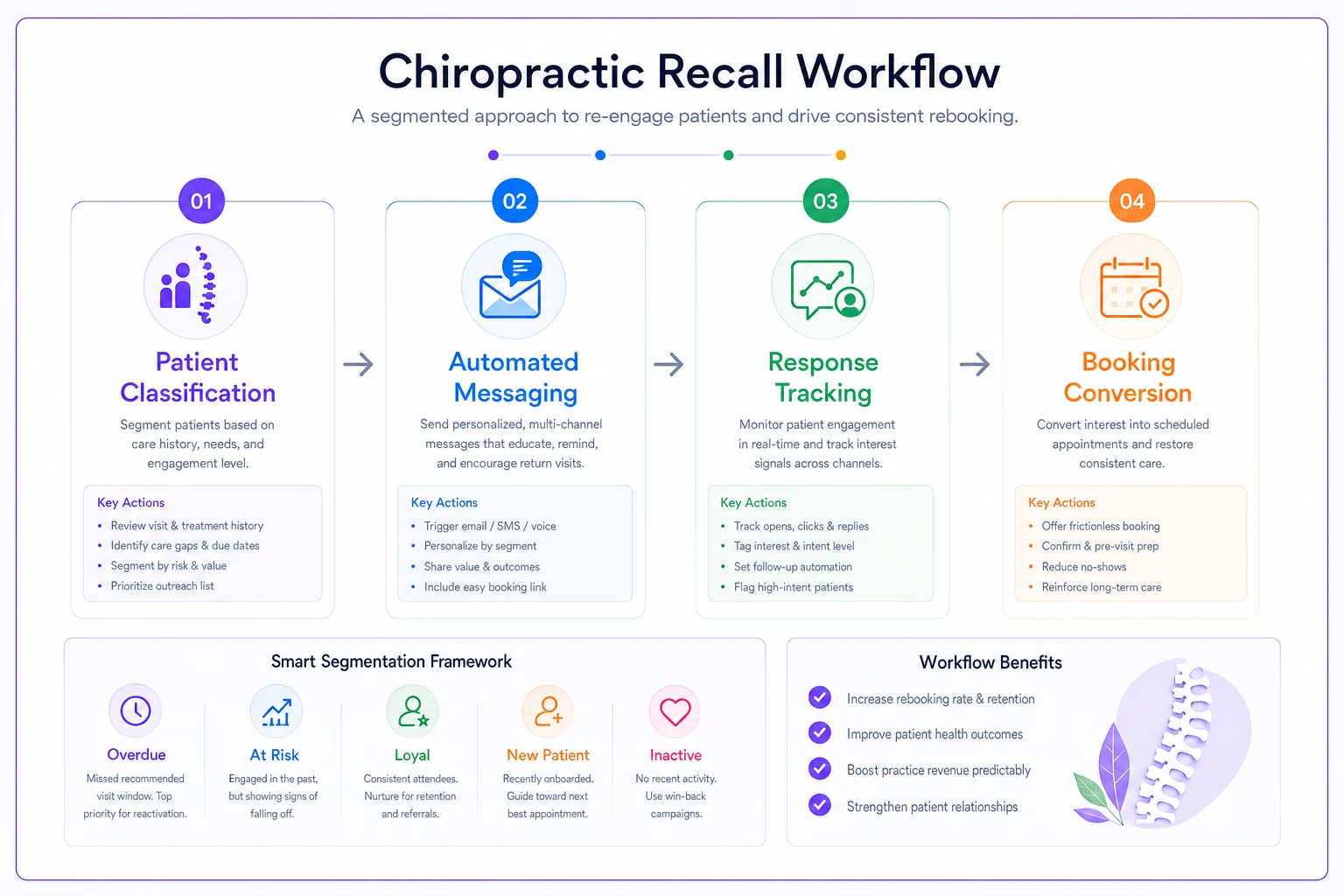
At-risk workflows require careful escalation. Start soft, increase urgency gradually, but know when to stop. Nobody wants to feel stalked. After 90 days, shift to quarterly win-back campaigns rather than continuous outreach.
The entire system should track responses and adjust automatically. Patient responds better to texts than emails? System notes it. Someone books afternoon appointments 80% of the time? Offer those slots first. Machine learning isn't required - simple preference tracking goes far.
Track contact-channel preference on first contact and use it as the primary channel for future outreach to improve conversion.
For new patients, trigger welcome sequences automatically after first appointments. Include education content, exercise reminders, and progress check-ins. Build in smart timing based on treatment plans - if someone's on a 3x/week plan, adjust message frequency accordingly.
Measuring What Matters: Lift Benchmarks by Segment
Generic recall systems measure one metric: overall rebooking rate. Segmented systems track performance by segment to identify optimization opportunities.
Baseline Performance (Generic Recalls): Overall rebooking sits around 8-12%. Revenue per recall averages $85. Patient lifetime value drops about 15% annually from poor retention.
| Segment | Target Rebooking Rate | Revenue per Recall | Typical Lift vs Generic |
|---|---|---|---|
| New Patients | 45-55% | $420 | +300% |
| Active Patients | 75-85% | $180 | +50% |
| Maintenance | 25-35% | $150 | +120% |
| At-Risk | 15-20% | $320 | +80% |
Track segment migration too. How many new patients become active? How many active become at-risk? This shows workflow effectiveness beyond just rebooking rates.
Monitor message engagement by segment. New patients might open 70% of education content but only 30% of appointment reminders. Active patients reverse that pattern. Adjust content mix accordingly.
Revenue impact varies dramatically by segment. Reactivating one at-risk patient who returns to active status generates $2,400-3,600 annually. Keeping one active patient from becoming at-risk saves $1,800-2,400 in lost revenue. New patient retention through proper early engagement drives $4,000-6,000 lifetime value.
Common Recall Workflow Failures
Even with segmentation, certain operational mistakes tank recall performance.
Over-automation without personalization Templates need personal touches. "[Name], Dr. Smith here" beats "Dear valued patient" every time. Include specific details - their usual appointment time, their specific condition, their treatment progress. Automation should feel personal, not robotic.
Ignoring channel preferences Some patients hate texts. Others never check email. Many miss phone calls. Track and respect preferences. A preferred channel message converts 3x better than a convenient-for-you channel.
Bad timing patterns Sending recalls at 2pm on Tuesday? That's when people are deep in work. Early morning (7-8am) and early evening (5-6pm) consistently outperform midday. Weekends vary by demographic - families respond Sunday evening, singles prefer Saturday morning.
Weak calls-to-action "Call us to schedule" requires effort. "Reply 1 for Tuesday 3pm, 2 for Thursday 10am" gets responses. Reduce friction at every step.
Giving up too quickly One message rarely works. But 47 messages annoys everyone. Find your sweet spot - usually 3-4 touches for active patients, 5-6 for at-risk, spread appropriately.
The Technology Stack That Makes This Scalable
Manual segmentation breaks after about 200 patients. You need systems that handle classification, messaging, and tracking automatically.
Your practice management system serves as the foundation. It holds appointment history, treatment plans, insurance information. Most modern systems include basic recall functionality, but few handle sophisticated segmentation natively.
Layer a patient communication platform on top. These systems pull data from your practice management system, apply segmentation rules, and execute multi-channel campaigns. Look for platforms that support email, SMS, and voice calls from a single workflow.
AI-powered tools can enhance but shouldn't replace human judgment. Use them for pattern recognition - identifying patients likely to drop off, predicting optimal appointment times, personalizing message content. But keep human oversight on actual patient communication.
Integration matters most. Your systems should talk to each other automatically. Patient books appointment? Workflow updates. Patient marked at-risk? Different campaign triggers. Patient responds to text? System logs preference.
Budget roughly $200-400 monthly for proper recall automation infrastructure. That investment returns 10-20x through improved rebooking rates and patient retention.
Advanced Tactics for Sophisticated Practices
Once basic segmentation runs smoothly, advanced tactics push performance higher.
Micro-segmentation by condition Low back pain patients have different patterns than headache patients. Sports injury patients differ from chronic pain patients. Build condition-specific recall workflows that acknowledge these differences.
Family unit coordination When multiple family members are patients, coordinate recalls. "Hey Smith family, everyone's due for adjustments. Want to book a family block next Tuesday evening?" These appointments stick better and generate higher visit value.
Insurance optimization timing Track insurance benefit usage and trigger recalls when patients have unused benefits approaching expiration. "You have 4 covered visits left and 6 weeks remaining in your benefit year" drives immediate action.
Referral activation through recalls Include referral prompts in certain recall messages. Maintenance patients who've been stable for 6+ months respond well to "Know anyone dealing with [their original complaint]?" additions.
Seasonal campaign layering Layer condition-specific campaigns onto your base recall workflow. Spring allergy season? Add sinus-focused messaging for relevant patients. Holiday stress period? Include stress-relief messaging for applicable segments.
Red Flags Your Recall System Needs Work
Some operational symptoms indicate broken recall workflows that hemorrhage revenue. Your front desk spending 2+ hours daily on phone recalls means your automation isn't working. Rebooking rates below 15% overall signal major problems.
More than 30% of patients going 60+ days between visits shows poor retention workflows. No tracking of why patients don't rebook means you're flying blind. Staff manually maintaining recall lists in spreadsheets instead of using automation wastes time and money.
Same message going to everyone regardless of history misses segmentation opportunities. No Spanish (or other relevant language) message options excludes significant patient populations. Patients complaining about too many or too few reminders indicates poor preference tracking.
Each symptom represents thousands in monthly lost revenue. A patient worth $2,400 annually who drops off due to poor recall engagement costs $200 monthly. Multiply by your inactive patient count.
Making the Transition Without Disrupting Operations
Switching from generic to segmented recalls feels overwhelming. Start small, scale gradually.
Month 1 should focus on classification. Sort your existing patients into the four segments. Run a basic audit - what percentage falls into each? Export this data and analyze patterns. You'll likely find 20-30% at-risk, which represents immediate revenue opportunity.
Month 2: Pick one segment to optimize first. Usually at-risk provides quickest wins because any improvement shows dramatic lift. Craft 3-4 messages, set up basic automation, track results.
Month 3: Add the second segment, usually new patients. Their high lifetime value justifies focus. Build your welcome sequence, education content, early engagement touches.
Months 4-6: Layer in remaining segments, refine messaging based on response data, optimize timing patterns.
The full transition takes 4-6 months for most practices. But you'll see revenue impact within 30 days from the first optimized segment.
Remember Dr. Martinez's practice in Phoenix. They had about 1,200 active patients but were barely hitting 8% recall rates. After implementing segmented workflows, they jumped to 28% overall within three months. The new patient segment alone generated an extra $8K monthly just from better early engagement messaging. Not revolutionary - just systematic.
Your chiropractic recall workflows determine whether patients stay engaged or silently drift away. Generic, one-size-fits-all recalls miss most rebooking opportunities. That's roughly $180K annually for an average practice.
Segmented recalls aren't complex - they just require operational discipline. Classify patients based on behavior. Craft messages that speak to their specific situation. Time outreach based on their patterns, not arbitrary intervals. Track what works, adjust what doesn't.
The clinics crushing retention don't have better patients or magical staff. They have better systems. Systems that recognize patient differences, respect communication preferences, and deliver value through every interaction.
Your recall system is either building patient relationships or slowly destroying them through generic, poorly-timed messages. Invest in segmentation, automation, and testing, or continue leaving thousands on the table monthly.
Start with one segment. Preferably at-risk, where any improvement shows immediate revenue impact. Build from there. Within 6 months, you'll wonder how you ever operated without proper recall segmentation.
The question isn't whether to implement segmented recall workflows. It's whether you'll do it before your competition figures out the same math.
Ready to streamline your chiropractic clinic operations?
Join 1,200+ clinics using Spinesly to save time, reduce scheduling errors, and improve patient care experiences.