


Most software evaluations fail for a boring reason: the person scoring the demo is not the person who will live inside the software at 7:45 AM on a packed Monday. The sales rep clicks through a clean, pre-loaded demo account, everyone nods, and six months later your front desk is manually re-keying eligibility because the "integration" was actually a CSV upload someone has to babysit.
This guide is built around that gap. Instead of listing every feature a chiropractic practice management software can theoretically have, it focuses on the features that break clinic workflows when they're missing or half-baked — and then on the part almost every buyer underestimates: the migration risk of moving off your current system.
If you're already in the "we've decided to switch" phase, pair this with the step-by-step data-migration and go-live checklist. This guide covers the stage before that — figuring out what to buy and how risky the move actually is.
Start by scoring workflows, not features
A feature list tells you what a system has. It doesn't tell you how many clicks it takes to do the thing you do 80 times a day. Those are very different questions, and the second one is where clinics lose hours.
The practical move is to pick five or six workflows that define your day and time them inside each system during the demo. Not "does it support SOAP notes," but "how long does a returning-patient adjustment note take, start to finish, including diagnosis pointers and plan carry-forward."
-
Returning-patient SOAP note (the one you repeat 20+ times a day)
-
New-patient intake → first note → treatment plan
-
Charge capture → claim submission → ERA posting
-
Eligibility check for a new insurance patient
-
Rebooking a patient into a care plan with recurring visits
-
Pulling an outstanding A/R report by payer
Time the workflows during a live demo with a staff member who actually performs them to avoid optimistic sales demos skewing results.
Score each on clicks, seconds, and how many screens you jumped between. Two systems can look nearly identical on a spec sheet while one takes 40 seconds for a return-visit note and the other takes close to three minutes. Over a year, that difference adds up to something close to a part-time salary.
The mistake most people make is scoring the presence of a feature instead of the friction of using it. A system that technically supports imaging integration but requires logging into a separate portal, exporting, and re-attaching isn't integrated in any way that matters to your throughput.
Core feature requirements that are non-negotiable for chiropractic
Chiropractic workflows have quirks that general-purpose medical software handles badly. These are the areas where "close enough" turns into daily annoyance.
Never miss another patient appointment.
Spinesly helps you schedule, confirm, and manage every patient visit efficiently.
- Unified appointment management
- Automated patient reminders
- Staff and resource scheduling
No credit card required
SOAP notes built for high-repetition, plan-driven care
Chiropractic documentation is unusually repetitive — same patient, similar regions, incremental changes across a care plan. The software should make reuse fast and review honest. That means strong templating, carry-forward from the last visit, region/segment selection that matches how you actually chart, and clean linkage between the note, the diagnosis, and the treatment plan.
Watch for two opposite failure modes. Notes so rigid you're fighting the template all day. Or cloned-forward notes that look suspiciously identical visit to visit — which is exactly what an auditor flags. Good software lets you move fast and reflect real clinical change.
Billing and eClaims that match chiropractic denial patterns
This is where chiropractic clinics bleed money quietly. The system needs clean CPT/ICD handling, modifier support (the AT modifier situation alone trips up a lot of billers), visit-limit tracking against payer caps, and real ERA/EOB posting — not just claim submission. Ask specifically how it handles secondary claims and partial payments, because that's where manual rework piles up.
Imaging and intake that don't live in a separate universe
For imaging, the question is whether results and orders flow into the chart or whether someone is manually bridging two systems. For intake, you want patients completing forms before they arrive, with that data landing in the record — not printed, re-typed, and mistyped at the front desk.
A quick reference for what "good" looks like versus common shortcuts vendors pass off as features:
| Area | What actually helps your workflow | The shortcut vendors call "support" |
|---|---|---|
| SOAP notes | Carry-forward + plan linkage, fast region charting | Generic free-text templates you build from scratch |
| eClaims | Integrated clearinghouse, ERA auto-posting, denial worklists | Claim export file you upload elsewhere |
| Imaging | Orders/results linked to the chart | A link that opens a separate portal login |
| Intake | Digital forms that populate the record | PDF forms emailed back for staff to re-key |
| Eligibility | Real-time checks inside scheduling | "Available through a third-party add-on" |
The right-hand column isn't useless — it's just manual labor disguised as a feature. Price that labor when you compare.
Compliance and security: the questions that actually surface risk
Every vendor will tell you they're HIPAA compliant. That's the floor, not a differentiator. The useful questions dig into how they handle the things that go wrong.
-
Will you sign a BAA, and what exactly does it cover?
-
Where is data hosted, and is it encrypted at rest and in transit?
-
How is role-based access handled — can I limit what a front-desk hire sees?
-
What's your audit log capability? Can I see who viewed or edited a record?
-
What's your breach notification process and timeline?
-
How do you handle data access if we leave — and is there a fee to get our own data out?
That last one is the sleeper. A surprising number of contracts make it easy to get in and expensive to get out. More on that below.
Pricing, contracts, and the costs that hide below the sticker
The monthly per-provider price is the number everyone compares. It's also the least useful number for predicting what you'll actually pay.
A realistic total-cost picture for a two-provider clinic includes a lot more than the headline:
-
Per-provider monthly fees
-
Clearinghouse/claim fees (sometimes per-claim, which scales with volume)
-
Payment processing markup if the system bundles payments
-
Implementation / setup fees
-
Data migration charges (frequently quoted after you've committed emotionally)
-
Training beyond the included hours
-
Charges for add-ons that turned out to be core — reporting, patient reminders, online scheduling
Here's a scenario that plays out more often than it should: two systems quote somewhere around $300–$500 per provider monthly. On paper they're roughly even. But one bundles claims, reminders, and online scheduling, while the other charges separately for each and tacks on a per-claim fee. At realistic volume, the "cheaper" one ends up running $4k–$7k more per year. The sticker lied.
Contract terms to nail down before signing:
-
Length of commitment and auto-renewal language
-
Price-increase caps (or the lack of them)
-
What's included in implementation vs. billed hourly
-
Data export rights and format on termination
-
Notice period required to cancel
Get the export clause in writing. "You own your data" is a philosophy statement. "You can export full clinical and financial records in a standard format at no additional charge within 30 days of request" is a contract term.
Implementation timelines: what's realistic, not what's promised
Sales teams quote the sunny version. A grounded timeline for a small-to-midsize chiropractic clinic typically runs four to eight weeks from signature to go-live, and longer if your data is messy or you're running insurance billing from day one.
A realistic phase breakdown:
-
Weeks 1–2 Configuration — templates, fee schedules, provider setup, payer enrollment. Payer enrollment is often the hidden bottleneck; it runs on the payers' clock, not yours.
-
Weeks 2–4 Data migration and a test import you actually review.
-
Weeks 4–5 Staff training on real workflows, not a slideshow.
-
Week 5–6 Parallel run or soft launch with a small patient volume.
-
Go-live, with the previous system kept readable for a defined window.
The most common timeline mistake is treating payer enrollment and clearinghouse setup as an afterthought. Clinics go live, start seeing patients, and then discover claims are sitting un-submittable because enrollment paperwork is still processing. Start that first.
The migration-risk evaluation framework
This is the part that separates a decent buying decision from a painful one. The migration out of your current system is usually riskier than anything about the new one — and it's where clinics genuinely get hurt: lost note history, broken A/R, downtime during a revenue-critical week.
1. Data export and import fidelity
The question isn't "can my data move," it's "can it move completely and correctly." Demographics and appointments usually transfer fine. The casualties are clinical notes (often flattened into PDFs instead of structured data), attachments, treatment plans, and open A/R with payment history.
Ask for a test migration using a real sample of your data — not their demo set — and inspect it yourself. Count the records. Open twenty random charts. Check that balances match.
2. Downtime exposure
Map exactly when the switch happens and what's unavailable during it. A go-live on a Monday morning before a full schedule is how clinics end up charting on paper and losing day-of payments. Prefer a low-volume window and keep the old system in read-only mode.
3. Testing before you trust it
You need a defined test plan: submit a test claim end-to-end, post a test ERA, create a note and confirm it carried forward, run an A/R report and reconcile it against the old system to the dollar. If the numbers don't tie out, you found the problem before it was a crisis.
4. Training before go-live, not after
Staff who learn the system live, on real patients, make real mistakes on real records. Training should happen on a populated test environment at least a week before go-live so the muscle memory exists on day one.
5. A rollback plan
Almost nobody has one, and that's the problem. Define the trigger — if X breaks and can't be fixed by Y, we revert — and keep the old system accessible long enough that reverting is actually possible. Rollback stops being an option the moment you've seen a week of patients and cancelled the old subscription.
For the operational detail on executing all five safely, the data-migration and go-live checklist walks through the sequencing day by day.
Here's a simple workflow diagram you can use to walk the team through the migration checks before cutover.
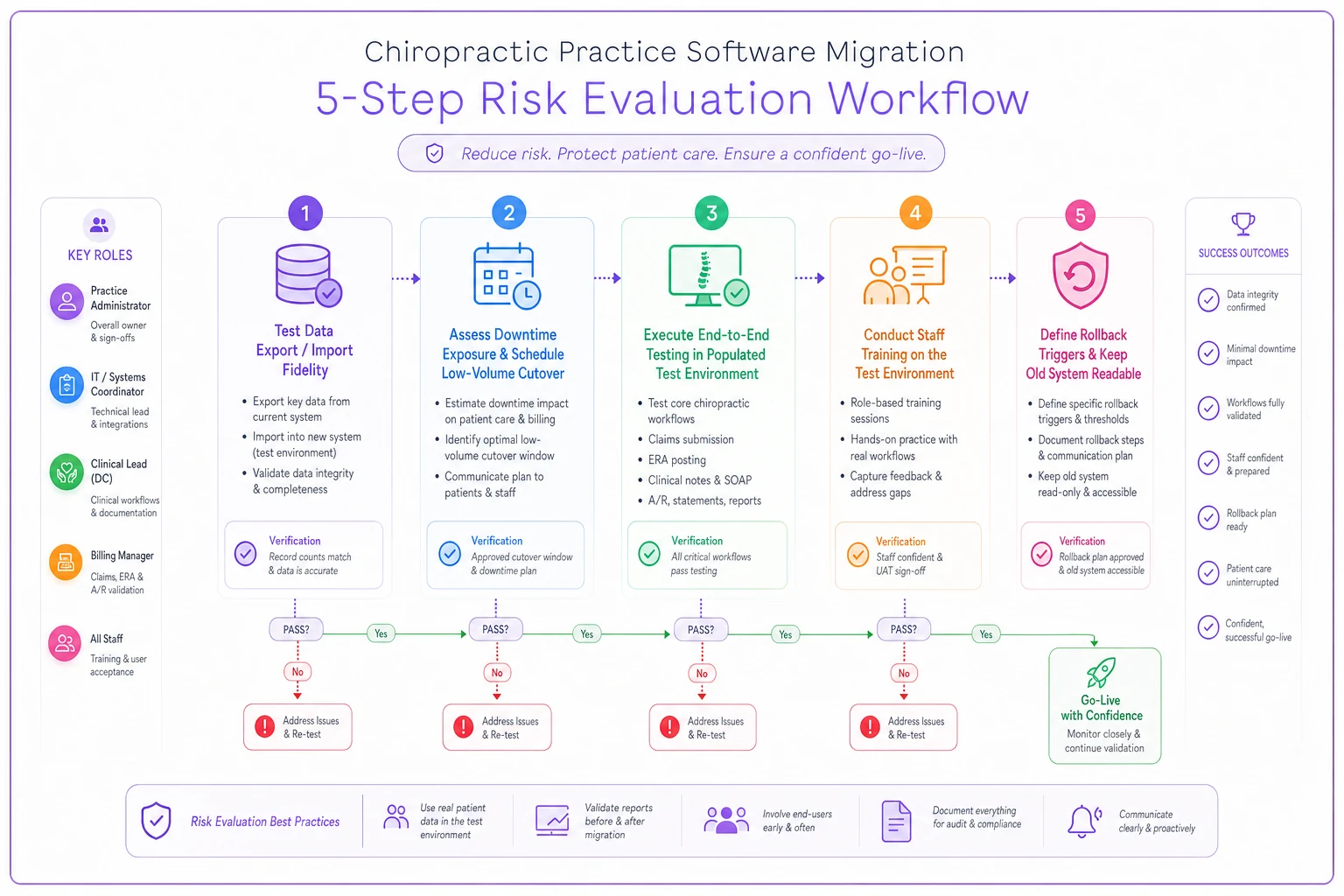
Use this diagram to walk the team through each check before cutting over.
A real scenario: the "cheap switch" that wasn't
A two-provider clinic running roughly 320–360 visits a month decided to switch systems to save on monthly fees — the new platform was about $180/month cheaper on the sticker.
They skipped the test migration to save setup time. At go-live, clinical notes came across as flattened PDFs instead of structured records, so carry-forward didn't work and providers were rebuilding patient history by hand. On top of that, about three weeks of open A/R imported with mismatched balances, and payer enrollment wasn't finished, so claims sat unsubmitted for nearly two weeks.
The cleanup — manual A/R reconciliation, re-keying notes, delayed cash from stalled claims — cost them well into the low five figures in staff time and slipped revenue over the first two months. The monthly savings were real. They just took over a year to offset the damage from the switch.
The fix wasn't a better vendor. It was a test migration and a parallel run. Both were offered. Both were skipped to move faster.
Your vendor-evaluation checklist
Use this as a scoring sheet across every finalist. Rate each item 1–5 based on your workflows, not the demo.
-
Workflow fit - [ ] Return-visit SOAP note speed (timed) - [ ] New-patient intake-to-note flow - [ ] Charge capture → claim → ERA posting - [ ] Treatment-plan and recurring-visit handling - [ ] Imaging orders/results in-chart
-
Billing & revenue - [ ] Integrated clearinghouse + ERA auto-posting - [ ] Modifier and visit-limit handling - [ ] Denial worklist / secondary claims - [ ] Reporting you can actually read
-
Compliance & security - [ ] BAA signed and specific - [ ] Role-based access + audit logs - [ ] Encryption at rest and in transit - [ ] Clear breach-notification process
-
Contract & cost - [ ] True total cost modeled at your volume - [ ] Price-increase caps - [ ] Data export rights in writing, no exit fee - [ ] Cancellation notice period
-
Migration risk - [ ] Test migration with your data offered - [ ] Notes migrate as structured data, not just PDFs - [ ] A/R + payment history transfer verified - [ ] Defined downtime window - [ ] Training on populated test environment pre-go-live - [ ] Written rollback trigger and plan
A finalist can win on features and still fail the migration-risk column. If it does, it's not the right buy — it's a problem waiting to happen.
Comparison matrix template
Drop your two or three finalists into a simple grid so the decision isn't driven by whichever demo was most recent in your memory.
| Criteria | Weight | Vendor A | Vendor B | Vendor C |
|---|---|---|---|---|
| Return-visit note speed | High | |||
| eClaims + ERA posting | High | |||
| Imaging integration | Medium | |||
| Intake automation | Medium | |||
| True annual cost (at your volume) | High | |||
| Data export rights | High | |||
| Migration test offered | High | |||
| Note migration fidelity | High | |||
| Downtime exposure | Medium | |||
| Training quality | Medium | |||
| Weighted total |
Weighting matters more than people expect. If you skip it, a vendor can win on five trivial features and lose on the one thing that determines whether your clinic functions on day one.
When switching makes sense — and when it doesn't
Switch when: your current system is actively costing you money — denials from weak billing tools, hours lost to documentation friction, no real reporting — or the vendor is stagnant, raising prices without adding value, or you've clearly hit the ceiling.
-
Your current system is costing you money via denials or lost productivity
-
The vendor is stagnant or raising prices without adding value
-
You've hit a functional ceiling with no roadmap for needed features
Don't switch when: the real problem is a workflow or training issue, not the software. Clinics sometimes blame the system for denials that are actually a front-desk eligibility problem or a coding habit. A new system won't fix a process gap. It'll just recreate it in a new interface, plus migration risk on top.
Who should be especially cautious: single-provider clinics with limited admin bandwidth, and clinics in a heavy insurance-billing season. If no one on your team can own the migration project, the risk goes up sharply regardless of how good the new system is.
If no one on your team can own the migration project, the risk goes up sharply regardless of how good the new system is.
Bringing it together
The best chiropractic practice management software for your clinic is the one that fits your actual daily workflows, prices honestly at your real volume, and lets you leave without holding your data hostage. Those three things matter more than any headline feature.
The migration itself deserves as much scrutiny as the purchase. Score workflows by hand. Model the true cost. Demand a test migration on your own data. Keep a rollback option open until the numbers tie out. The clinics that treat migration as a project — not an afterthought — are the ones that switch without a single lost claim.
When you're ready to execute the move, work through the detailed data-migration and go-live checklist so nothing gets left to chance on the day it matters most.
Ready to streamline your chiropractic clinic operations?
Join 1,200+ clinics using Spinesly to save time, reduce scheduling errors, and improve patient care experiences.