


Most chiropractors don't buy practice management software. They inherit it. Someone set it up years ago, the clinic grew around its quirks, and now you're stuck working around limitations you forgot were even limitations. Then a demo rep shows you something shiny, you panic about switching, and the cycle repeats.
This guide isn't another feature checklist you could pull from any vendor's marketing page. It's the stuff that actually determines whether a system works for a chiropractic clinic — the care-plan structures, the billing quirks, the demo traps, and the contract language that quietly locks you in.
If you're already past the evaluation stage and ready to move, pair this with the data-migration and go-live checklist so you don't lose patient history in the handoff.
Start With What's Different About Chiropractic
Nobody tells you this upfront: most "medical" or "all-in-one" practice management software was built for general medicine, dentistry, or physical therapy, then lightly adapted for chiropractic. And that adaptation is usually pretty shallow.
-
Care plans with visit frequency tapering. A patient on 3x/week for four weeks, then 2x/week, then maintenance. Generic scheduling treats every appointment as a standalone event. Chiropractic needs the plan baked into scheduling and billing so the front desk isn't manually tracking "visit 7 of 24."
-
High-volume, short-duration visits. Some clinics run 40–60 adjustments a day. If check-in, room assignment, and charge capture take 90 seconds too long per patient, you lose real chair hours.
-
Payer scrutiny on maintenance care. Medicare's active-treatment vs. maintenance distinction, the AT modifier, and visit caps mean your documentation and billing have to talk to each other tightly.
-
Imaging and outcome tracking living alongside SOAP notes, not in a separate silo.
When you evaluate a system, the first question isn't "does it have scheduling and billing." Everything has those. The real question is whether it understands how chiropractors actually deliver care.
A quick gut-check during any demo: ask the rep to build a 24-visit care plan with a tapering schedule and show you how a front-desk person books the next appointment and sees remaining visits. If they fumble or say "you'd track that separately," that tells you most of what you need to know.
The Must-Have Features (And the Ones Vendors Oversell)
There's a real split between what actually matters for a chiropractic clinic and what sounds impressive in a demo but rarely changes your week.
Never miss another patient appointment.
Spinesly helps you schedule, confirm, and manage every patient visit efficiently.
- Unified appointment management
- Automated patient reminders
- Staff and resource scheduling
No credit card required
Features that genuinely matter
Care-plan-aware scheduling. You should be able to set a plan and have the system suggest or auto-book the recurring cadence, warn when a plan is running out, and flag patients who've fallen off schedule. This single capability quietly protects retention.
Chiropractic-specific SOAP templates. Not a blank note field — templates built around regions, techniques, and the phrasing payers expect. If your providers are retyping the same subluxation and technique notes all day, the software is working against you.
Integrated charge capture at point of care. The adjustment, the CPT code, and the charge should connect in one motion. When documentation and billing live in separate systems that "sync nightly," you get mismatches, missed charges, and denials.
Insurance eligibility and visit-cap tracking. Real-time eligibility checks and a running count against annual visit limits. Clinics that track this manually eventually bill past the cap and eat the write-off.
Patient communication built in. Appointment reminders, recall messaging for lapsed patients, and two-way texting. The clinics with the best retention have this automated rather than relying on a front-desk person to remember.
Features that get oversold
"AI-powered everything." Some automation genuinely helps — flagging patients due for recall, surfacing coding suggestions, generating reminder sequences. But be skeptical of vendors promising the software will write your notes or manage your whole revenue cycle hands-off. Useful automation reduces repetitive clicks and catches mistakes; it doesn't replace clinical judgment or your billing person.
Built-in marketing suites. Most are weak and you'll end up using dedicated tools anyway. Don't pay a premium for a feature you'll abandon in month two.
Fancy patient portals with 40 features. Patients use maybe three: book an appointment, check their next visit, and pay a bill. A clean portal that does those three well beats a bloated one every time.
Integration and Compliance: Where Deals Quietly Fall Apart
This is the section buyers skip during the excitement of a good demo, and it's exactly where the pain shows up six months later.
Integration questions to force an answer on:
-
Does it connect with your clearinghouse, or are you stuck with their in-house billing pipeline?
-
Can it talk to your imaging system, or will X-rays live in a disconnected folder?
-
Does it export clean data if you leave? (More on this in the contract section.)
-
Payment processing
are you locked into their processor, and what's the real rate?
On compliance, chiropractic clinics carry the same HIPAA obligations as any covered entity, but a few things deserve extra attention:
-
Business Associate Agreement (BAA). Non-negotiable. Any vendor touching PHI signs one. If they hesitate, walk.
-
Audit logging. You want to see who accessed what and when. This matters during a breach investigation and during payer audits.
-
Role-based access. Your front desk shouldn't see full clinical notes they don't need; your billing person needs charge data but not necessarily the full exam narrative.
-
Data encryption at rest and in transit. Ask specifically. "We're secure" is not an answer.
The clinics that get burned on compliance usually don't get burned by hackers. They get burned by a vendor that stored data in a way that made an audit or migration painful, or by an unsigned BAA that surfaced during a complaint. Boring stuff, real consequences.
Pricing Models: Understand What You're Actually Paying
Chiropractic PM software pricing is messier than it looks on the website. Here's how the common models break down and what to watch for.
| Pricing Model | How It Works | Watch Out For |
|---|---|---|
| Per-provider flat monthly | Fixed fee per DC | Costs balloon as you add associates; part-time providers often charged full rate |
| Per-location | Fixed fee per clinic | Multi-location discounts often weaker than advertised |
| Percentage of collections | They take a cut of billing | Can quietly cost more than flat fees as you grow; aligns their incentive but punishes volume |
| Tiered feature bundles | Base price, add-ons for billing/comms/portal | The feature you need is almost always one tier up |
| Transaction/payment fees | Markup on card processing | Often the hidden profit center; compare to standalone processors |
The trap most clinics fall into is comparing base prices. A system at $299/month with a built-in clearinghouse, no payment markup, and all features included can be cheaper than one at $199/month where eligibility checks, text reminders, and the patient portal are each separate add-ons — and where payment processing quietly skims an extra 0.5%.
A realistic example: a two-provider clinic running roughly 330–360 visits a month was quoted $219/month base. After adding eligibility verification, two-way texting, the patient portal, and accounting for the payment markup on about $45k in monthly collections, the true cost landed closer to $540–$580/month. The "cheaper" competitor they almost skipped was $420 all-in. Always build the fully-loaded monthly number before comparing.
A Demo Scorecard You Can Actually Use
Demos are designed to impress, not to inform. The rep drives, the data is clean, and the workflow is rehearsed. You need to take the wheel. Rate each item 1–5, and bring the same list to every demo so you're comparing apples to apples.
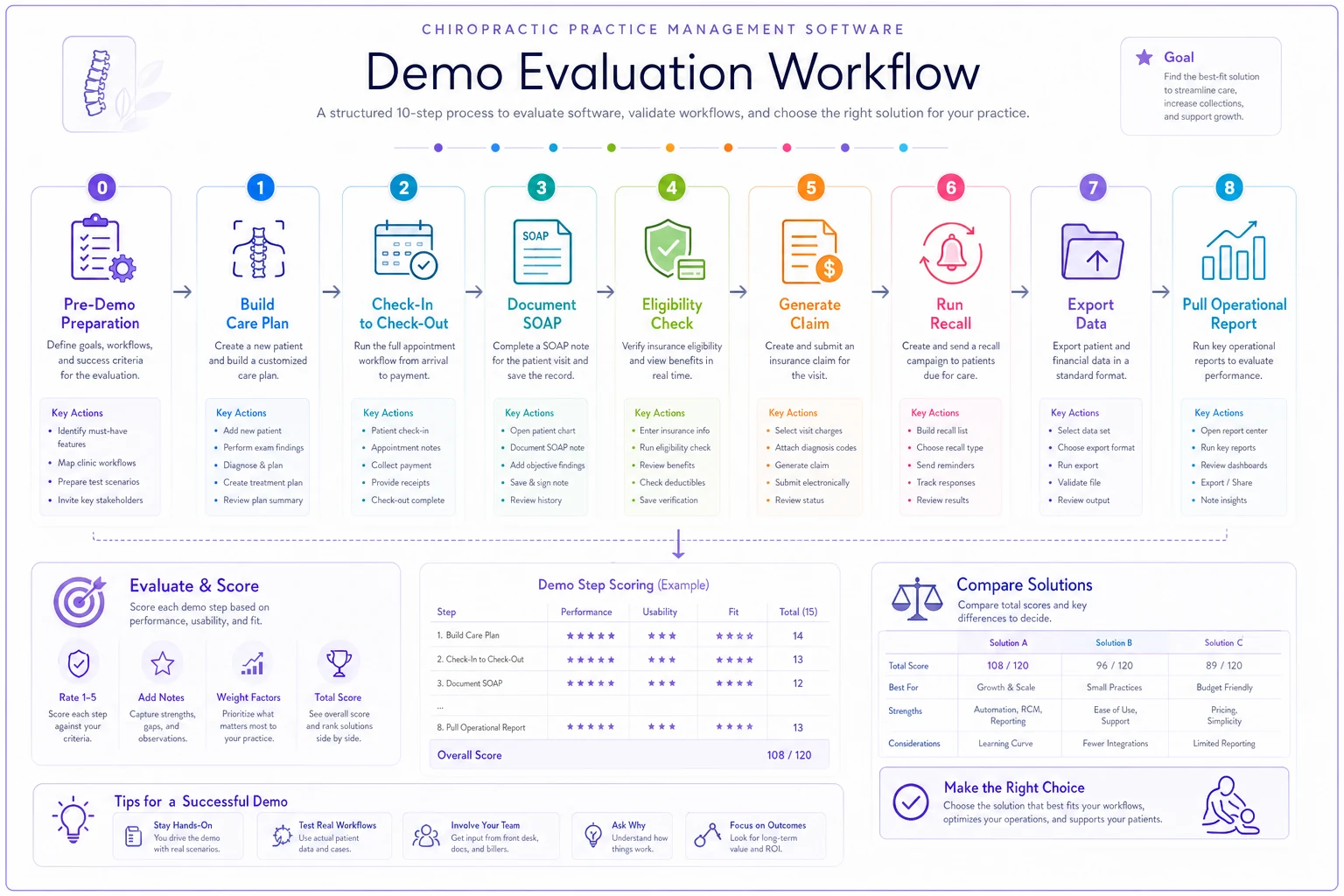
Walk the rep through these — don't let them walk you:
-
Build a tapering care plan and book the recurring visits. Time how long it takes.
-
Run a full check-in-to-checkout cycle for one patient, including charge capture. Count the clicks.
-
Document a SOAP note using their chiropractic template. Is it fast, or are your providers going to fight it?
-
Pull a visit-cap/eligibility check in real time.
-
Generate a claim and show where denials would surface.
-
Run a recall report for patients who've lapsed, and show how outreach gets triggered.
-
Export your data — ask them to show you what a full data export actually looks like.
-
Pull one operational report you'd check weekly (collections, no-show rate, provider productivity).
If a rep says "let me get back to you" on more than one or two of these, that's data. The things they can't show live are usually the things that don't work well.
One more move: ask to talk to a chiropractic clinic of similar size that switched to them in the last year. Not a cherry-picked testimonial — a reference you can ask directly about go-live headaches and billing hiccups.
Contract Red Flags That Cost You Later
The contract is where the relationship actually lives. A smooth sales process means nothing if the agreement traps you. Watch for:
-
Auto-renewal with a tight cancellation window. Some require 90 days' notice before an annual renewal. Miss it and you're locked in another year. Calendar the notice date the day you sign.
-
Data hostage clauses. Who owns your data? Can you export it in a usable format, and is there a fee? "Data export available upon request for $X" is a flag. Your patient records should never be held for ransom.
-
Price escalation language. "Fees may increase annually" with no cap. Ask for a cap in writing — 3–5% is reasonable, open-ended is not.
-
Mandatory payment processing. If you must use their processor at their rate, you've lost negotiating power on a real cost center.
-
Implementation fees that appear late. Setup, training, and migration fees sometimes don't show up until the final contract. Get the total first-year cost, including onboarding, in writing.
-
Uptime with no teeth. A 99.9% uptime "goal" with no service credits is marketing, not a guarantee.
The single most important clause for most clinics is data portability. Everything else you can live with or renegotiate. Being unable to cleanly extract your own patient history is what turns a future switch into a nightmare.
When Switching Actually Makes Sense (And When It Doesn't)
Not every frustration justifies a migration. Switching systems is genuinely disruptive — there's a learning curve, a data risk, and a productivity dip during go-live. Be honest about which situation you're actually in.
Switching makes sense when:
-
Your current system can't support care plans or chiropractic documentation, and you're working around it daily.
-
Denials are climbing because billing and documentation don't connect.
-
The vendor is raising prices with no added value, or support has deteriorated.
-
You're growing — adding providers or locations — and the system doesn't scale.
-
Your data is trapped in something being sunset or no longer updated.
Switching is a bad idea when:
-
Your real problem is a workflow or training issue, not the software. New software won't fix a front desk that doesn't follow process.
-
You're in the middle of a busy season or a billing crunch. Timing matters.
-
You're chasing one shiny feature you'll use twice a year.
-
You haven't fully mapped your current data and can't say what needs to migrate.
A solo clinic with stable billing, decent support, and a system that does the job — even if it's a little dated — has no good reason to switch. "It's not perfect" isn't a reason. "It's actively costing me money or capping my growth" is.
If you do decide to move, the risk is almost entirely in the transition. Patient records, billing history, and open claims have to come across intact. The data-migration and go-live checklist walks through protecting that history and sequencing the cutover so you don't lose data or stall collections.
A Real Scenario: Two-Provider Clinic, Rising Denials
A two-DC clinic running around 350 visits a month was on a general-purpose EHR that had been loosely adapted for chiropractic. Care plans were tracked on a spreadsheet taped next to the front desk. Documentation lived in one system, billing in another, syncing overnight.
The symptoms: denial rate creeping toward 12–14%, mostly from mismatched codes and maintenance visits billed without the right modifiers. The front desk spent a chunk of every morning reconciling the care-plan spreadsheet with the schedule. Two or three visits a week were billed past Medicare caps and written off.
They evaluated three systems using a scorecard like the one above. The deciding factor wasn't price — it was a demo where one vendor built a tapering care plan and captured charges in the same workflow in under a minute, while the others couldn't cleanly do it live.
After switching and getting through the go-live dip, denials settled into the 5–7% range over the following quarter. The morning reconciliation routine basically disappeared. Over-cap write-offs stopped because the system flagged remaining visits automatically. Nothing dramatic in month one — but the drift stopped, and the recovered denials alone covered the software cost several times over.
The lesson wasn't "this software is magic." It was that the mismatch between their old system and how chiropractic actually works was quietly bleeding money, and they'd stopped noticing because it had always been that way.
Next Steps
Don't start by browsing vendor websites. Start by writing down the three operational problems that are actually costing you money right now — whether that's denials, lapsed patients, front-desk reconciliation time, or capacity you can't schedule. Those three problems are your real buying criteria. Everything else is noise.
Then run two or three demos with the scorecard, build the fully-loaded monthly price for each, read the contract for the red flags above, and talk to a reference clinic your size. Take your time on the contract and the data-portability clause specifically — that's the part that protects you years from now.
When you've made the call, treat the migration itself as its own project with its own plan. The software decision matters, but the switch is where clinics actually get hurt. Run it carefully, back everything up, and sequence the cutover so patient care and collections don't skip a beat.
Ready to streamline your chiropractic clinic operations?
Join 1,200+ clinics using Spinesly to save time, reduce scheduling errors, and improve patient care experiences.