


Most buyer's guides for chiropractic practice management software rank vendors on feature counts. That's exactly how clinics end up locked into a platform they regret. The feature list looks great in the sales demo, then eighteen months later you're paying for three integrations that don't talk to each other, your claim scrubbing broke after an update, and exporting your patient data costs $4,000 and takes six weeks.
The real decision isn't "which software has the most features." It's "which vendor can I live with for the next five to seven years, and how badly will it hurt if I'm wrong?" This guide is built around that framing. We'll move through the feature must-haves quickly, then spend most of the time on the parts buyers skip: interoperability checks, vendor due diligence, contract terms, and a migration-risk scorecard that tells you how expensive a mistake would actually be.
Start With the Switching-Cost Question, Not the Feature List
Before you compare any vendors, answer one question: if this goes badly, how trapped am I?
That question reframes the whole evaluation. A platform with 90% of the features you want but a clean data-export policy is safer than one with 100% of the features and a proprietary database you can never fully leave. Switching cost is the hidden variable that determines whether you're actually choosing software or just choosing your next five years of frustration.
Clinics rarely leave a platform because it lacks features. They leave because support quietly degraded after an acquisition, pricing crept up 18% a year, or a billing update broke their claim flow during a busy month. None of that shows up in a feature comparison. All of it shows up in vendor due diligence and contract terms.
Evaluate fit and exit together. A platform you can leave cheaply earns the right to be imperfect.
Must-Have Features — The Short Version
You already know what a chiropractic clinic needs day to day. The point here isn't to list every feature — it's to flag the ones where vendors quietly underdeliver.
Never miss another patient appointment.
Spinesly helps you schedule, confirm, and manage every patient visit efficiently.
- Unified appointment management
- Automated patient reminders
- Staff and resource scheduling
No credit card required
-
Scheduling with recurring care-plan support. Chiropractic care runs on multi-visit plans. A lot of generic medical PM software handles one-off appointments fine but forces awkward workarounds for a 3x/week-for-4-weeks plan. Test this in the demo with a real plan, not a single booking.
-
Integrated SOAP documentation built for spinal/adjustment workflows. Templates matter. If notes take longer than the adjustment itself, you've bought the wrong tool.
-
Claims and billing with chiropractic-specific coding support. Check that it handles the CPT/modifier combinations you actually use and that claim scrubbing is included, not a paid add-on.
-
Patient communication (reminders, recalls, intake forms). Confirm two-way texting and whether message volume is capped or metered.
-
Reporting you can actually read. Ask to see the raw report exports, not the dashboard screenshots. Dashboards are marketing; CSV exports are reality.
-
Card-on-file and point-of-care payment handling. Verify how refunds, partial payments, and payment plans work.
For every feature above, ask: "is this native or is it a bolt-on from a third party?" Bolt-ons are where interoperability goes to die. A "fully integrated" billing module that's actually a rebranded partner product is the thing that breaks after an update and leaves both vendors pointing fingers at each other.
Pricing Models — Read Past the Monthly Number
Chiropractic practice management software is usually priced one of three ways, and the sticker price tells you almost nothing about what you'll actually pay.
| Pricing Model | What's Advertised | What Actually Hits Your Bill |
|---|---|---|
| Per-provider / month | "$299/provider" | Add-ons for texting, claims scrubbing, patient portal, extra storage |
| Percentage of collections | "We only win when you win" | 4–7% of everything you collect — can quietly exceed flat pricing as you grow |
| Flat platform fee + usage | "$500/mo all-in" | Per-statement fees, per-claim fees, payment processing markup |
The percentage-of-collections model deserves special scrutiny. It feels aligned early on, but run the math at your projected volume. A clinic collecting roughly $55k–$65k a month at 5% is paying close to $3,000 monthly — more than most flat plans, and it scales against you as you grow.
During evaluation, ask each vendor for a sample invoice from a clinic your size. Not a quote — an actual anonymized invoice. The gap between the quote and the real invoice is where you learn who's actually honest about pricing.
Integration and Interoperability Checks
This is where most guides get vague. The questions that actually separate vendors:
-
Does it have a real API, and is it included or extra? "We have an API" often means "we have an API your developer can use for $X/month plus per-call fees." Get it in writing.
-
How does it handle clearinghouse connections? Ask which clearinghouses it works with and whether switching clearinghouses later is possible or locked.
-
Lab/imaging results flow. If you do imaging, confirm how results attach to the patient record. A broken imaging workflow means staff manually re-keying everything.
-
Data export format and completeness. Ask
"If I leave, exactly what do I get?" The right answer includes patient demographics, full clinical notes, appointment history, and financial records in a standard format. The wrong answer is "a PDF per patient" — which is technically an export and practically useless.
-
Accounting/payroll handoff. Does it export clean financials, or will your bookkeeper be reconciling by hand every month?
Clinics assume integration works because the sales team said "it integrates with everything." It doesn't. "Integrates" ranges from a true two-way sync to a manual CSV import you run yourself. Ask which one you're getting for every connection that matters.
Security and Compliance — The Non-Negotiables
You handle PHI, so this isn't optional. Focus on things that are both verifiable and meaningful.
-
Signed BAA. Non-negotiable. If a vendor hesitates on a Business Associate Agreement, the evaluation is over.
-
Encryption at rest and in transit. Standard now, but confirm it in writing.
-
Access controls and audit logs. Can you see who viewed or changed a record? You'll want this the day a dispute or audit happens.
-
Breach notification terms. How fast do they notify you, and who's responsible for what? This should be in the contract, not a verbal assurance.
-
Hosting and backup practices. Where's the data, how often is it backed up, and have they ever had an outage long enough to stop a clinic day?
Security incidents rarely come from the software itself. They come from the handoff — weak passwords, shared logins at the front desk, a staff member clicking something they shouldn't. The vendor's job is to give you the controls; your job is to actually use them. Audit logs and role-based permissions are only as good as the habits built around them.
Vendor Due Diligence — The Part Everyone Skips
Software evaluation tends to treat vendors as if they'll always be the same company offering the same service. They won't. The chiropractic software space has seen steady consolidation — smaller platforms get acquired, and the experience afterward is a coin flip.
-
Ownership and funding. Is this vendor independent, PE-backed, or recently acquired? PE-backed platforms often raise prices and cut support within 12–24 months of acquisition. Not always, but often enough to ask.
-
Support model. Phone, chat, email? What are the hours, and are they staffed by people who understand chiropractic billing or a generic tier-1 queue? Call support before you buy and time the response.
-
Update cadence and communication. How often do they push updates, and do they warn you before changes that affect billing or documentation? Surprise updates during a busy week are a known pain point.
-
Reference clinics your size. Ask for two or three references from clinics with similar provider counts and payer mix. Then actually call them — and ask what broke, not just what they loved.
-
Longevity. How long has the platform existed, and how long have your reference clinics been on it? A vendor everyone leaves after two years tells you something.
The sharpest due-diligence question you can ask a reference: "What do you do now that the software doesn't handle, that you assumed it would?" That answer is worth more than any feature sheet.
ROI — Count the Time, Not Just the Subscription
ROI on practice management software isn't about one subscription versus another. It's about labor hours recovered and revenue leaks closed.
If better claim scrubbing and cleaner documentation cut your denial rework by even a few hours a week, that's real money. Say your biller spends 8–10 hours a week chasing denials and resubmitting claims. Shave that by a third with better tooling and you're recovering roughly 3 hours weekly — close to 150 hours a year of skilled labor redeployed to actual collections.
The other side of ROI is the cost of getting it wrong, which brings us to something most buyers never quantify: migration risk.
The Migration-Risk Scorecard
Before you commit, score each finalist vendor on how risky the switch to them — and away from them later — would actually be. Higher score means higher risk.
| Risk Factor | Low Risk (1) | Medium (3) | High Risk (5) |
|---|---|---|---|
| Data export policy | Full standard export, self-serve, free | Export available, vendor-assisted, modest fee | Proprietary format or high export fee |
| Migration support | Dedicated migration team included | Paid migration service | "Here's a CSV template, good luck" |
| Historical data mapping | Full clinical + financial history migrates | Partial history, some manual entry | Only demographics migrate |
| Downtime during cutover | Weekend cutover, tested rollback | A day or two of reduced capacity | Multi-day blackout, no rollback plan |
| Staff retraining load | Similar workflow, short learning curve | Moderate retraining | Completely different system, weeks to ramp |
| Contract exit terms | Month-to-month or short term | Annual with clear exit | Multi-year with early-termination penalty |
Total the scores across your finalists. A platform scoring in the low range (roughly 6–12) is a safe bet even if it's not the flashiest. A platform scoring 20+ needs either a genuinely extraordinary feature advantage or a hard pass.
Pro-tip: Score both directions — onto and off — separately to surface asymmetric risks.
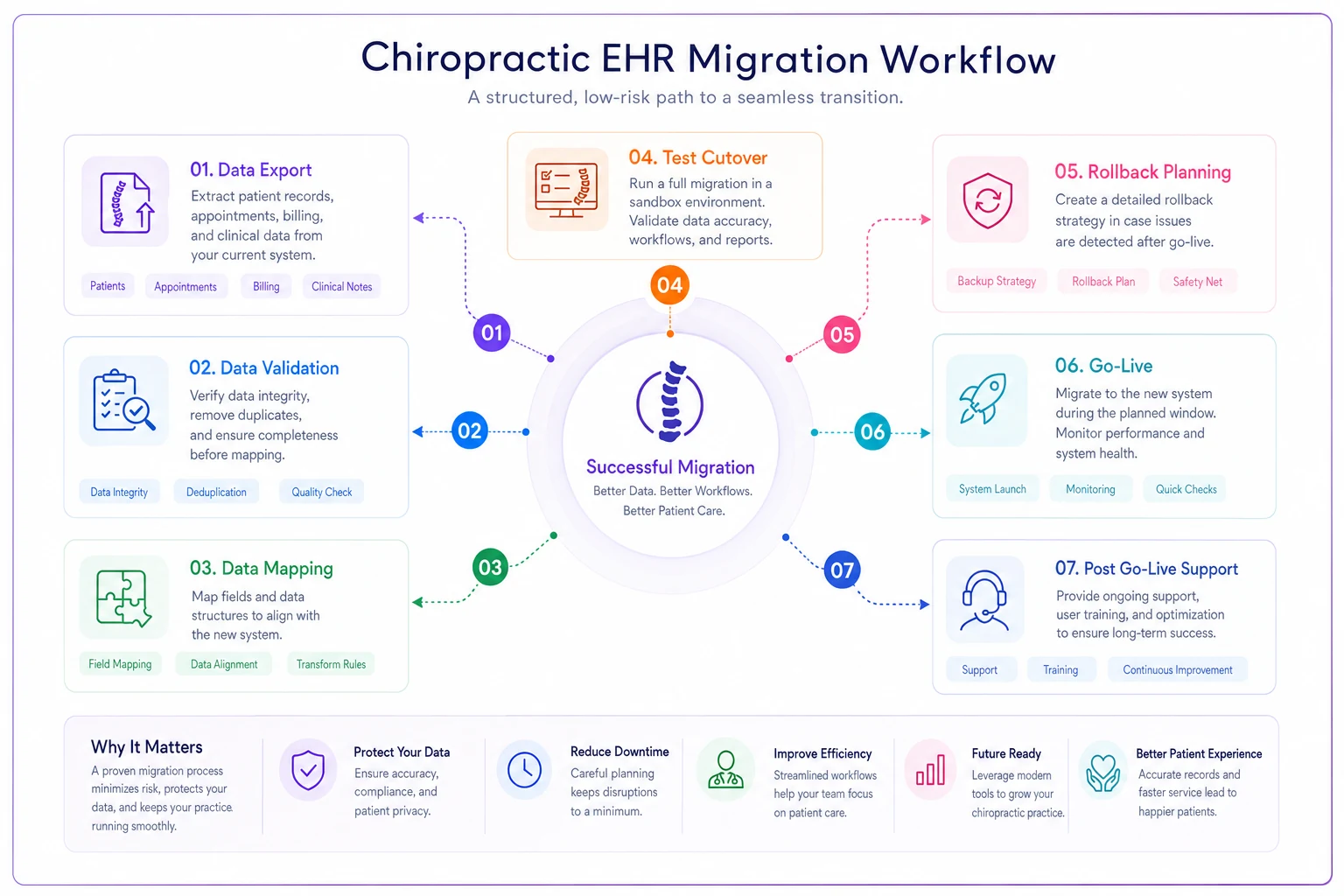
Worth sitting with: the things that make it hard to move onto a platform cleanly are usually the same things that make it hard to move off later. Score both directions.
Contract and SLA Negotiation — What's Actually Negotiable
Clinic owners often assume SaaS contracts are take-it-or-leave-it. For small single-location practices, that's mostly true on price. But several terms are negotiable even for small buyers, and vendors rarely volunteer the flexibility.
-
Price-lock duration. Get your rate locked for the contract term and cap annual increases. A 3–5% annual cap in writing beats an uncapped "we may adjust pricing" clause.
-
Data export guarantee. Get the export terms — format, cost, timeline — written into the contract, not referenced in a policy doc they can change later.
-
Uptime SLA with teeth. An SLA that promises 99.9% uptime but offers no remedy is marketing. Ask what happens when they miss it. Service credits are standard; get them specified.
-
Support response times. Define "support" with actual response-time commitments for different severity levels. "Billing is completely down" should not sit in the same queue as "how do I change a logo."
-
Exit assistance. Negotiate migration-out help now, while you have leverage. The day you're leaving, you have none.
The best time to negotiate exit terms is the moment the vendor wants your signature most. Once you're a customer, every concession becomes a support ticket they can deprioritize.
A Real Scenario
A three-provider clinic running close to 340 visits a week was weighing two platforms. One had a slicker interface and a strong patient-engagement module. The other was plainer but offered free full-data export and a dedicated migration team included in the base price.
They almost picked the slicker one. Then they ran the migration-risk scorecard. The flashy platform scored high on exit terms — proprietary export, $3,500 export fee — and migration support that amounted to a self-serve CSV template. The plainer one scored low across the board.
They went with the plainer platform. Eighteen months later, when the flashier vendor got acquired and raised prices on existing customers by around 20%, several clinics in their referral network were stuck paying thousands just to escape. The clinic that scored for exit risk was fine. When they later needed to add an imaging integration, their full data history was clean and accessible because the export architecture had been open from day one.
The feature gap they were worried about? Their staff stopped noticing it within a month. The switching cost they avoided saved them roughly $3,000–$4,000 and weeks of disruption they never had to live through.
When a Flashier Platform Actually Makes Sense
The safe choice isn't always right. A feature-rich, higher-lock platform can be worth it when:
-
You're a larger multi-location group where a specific feature — advanced analytics, multi-site scheduling — directly drives revenue at scale.
-
The vendor is clearly stable, independent, and has a long track record with clinics your size.
-
The lock-in terms are genuinely offset by a feature you can't operate without.
It's a bad idea when you're a small practice choosing complexity you won't use, or when the only reason the platform wins is a demo that impressed you for 30 minutes.
Who Should Slow Down
If you're under pressure to switch right now — a current platform sunsetting, a billing crisis, a lease on legacy software expiring — resist the urge to skip due diligence. Rushed software decisions made under pressure are how clinics end up with the worst long-term fit. Buy yourself a short bridge (even a month-to-month extension of the old system) rather than signing a five-year contract in a panic.
A few extra weeks of the old system is almost always cheaper than years of regret with the wrong one.
Pulling It Together
Clinics that choose practice management software well don't do it by finding the platform with the most features. They do it by scoring the two things everyone else skips — switching cost and vendor reliability — and treating features as the tiebreaker, not the headline.
Run your finalists through the migration-risk scorecard. Call the reference clinics and ask what broke. Get export terms and price caps in writing. Then, once you've chosen, work the switch like the project it is, using a real go-live and data-migration checklist so the transition doesn't undo everything your evaluation got right.
The platform you can confidently leave is usually the one you'll be happiest staying on.
The platform you can confidently leave is usually the one you'll be happiest staying on.
Ready to streamline your chiropractic clinic operations?
Join 1,200+ clinics using Spinesly to save time, reduce scheduling errors, and improve patient care experiences.