

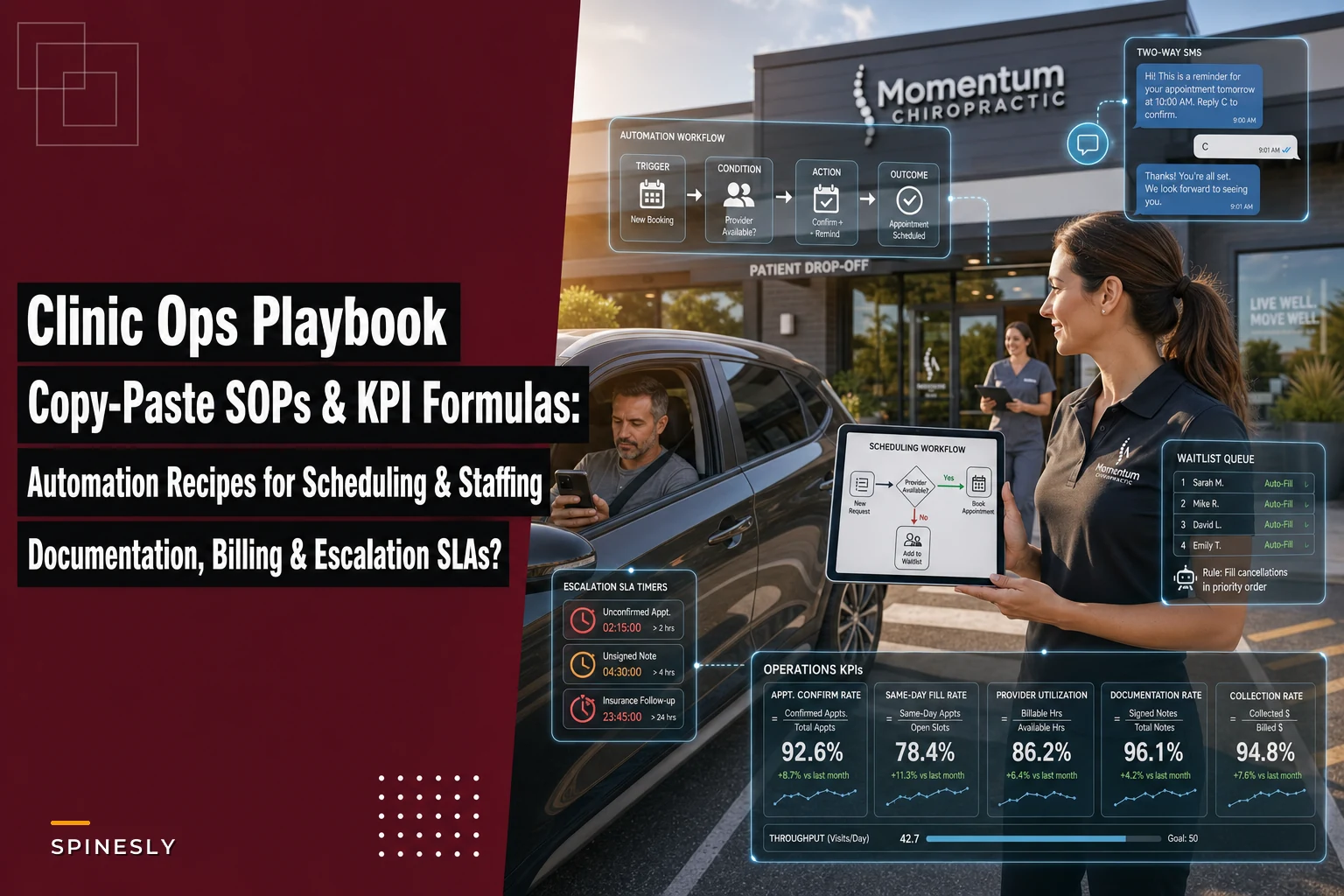

If you already read the parent guide on the four operational systems that let chiropractic clinics scale, you know the framework. What that guide doesn't do — on purpose — is hand you the actual checklists, formulas, and message templates you can paste into a binder and use Monday morning.
This is that missing piece. Not theory. The actual SOP text, KPI math with denominators spelled out, escalation timers, and automation logic written in trigger/condition/action format. Everything here is scoped so a front desk hire on day three can follow it, and an owner can audit it in ten minutes.
One thing worth naming before we get into it: the biggest reason clinic "systems" fail isn't that they're poorly designed — it's that the SOP lives in someone's head and the KPI has no agreed definition. Two staff members calculate "no-show rate" three different ways and nobody notices until the numbers stop matching. So every checklist below names an owner, sets a turnaround, and every KPI has exactly one formula. Change the numbers to fit your clinic, but keep the structure intact.
System 1: Scheduling
SOP 1A — New Patient Booking (owner: Front Desk Lead)
SLA: booking confirmed within 4 business hours of inquiry. Insurance eligibility started same day.
-
Capture name, DOB, phone, email, chief complaint, and referral source in the intake field — not a sticky note.
-
Offer the first available new-patient slot plus one alternative. Never offer "whenever works."
-
Collect insurance card photo (front/back) and ID before ending the call or chat.
-
Trigger eligibility check (manual or automated — more below). Tag the chart "ELIG PENDING."
-
Send intake forms with a same-day deadline and the appointment confirmation in one message.
-
If forms aren't returned 24 hours before the visit, flag for a reminder call.
The mistake that keeps coming up: front desk books the slot but defers eligibility to "later." Later becomes the morning of the visit, and now you've got a patient in the chair with a plan that doesn't cover the service. Eligibility starts the same day the appointment is made, full stop.
SOP 1B — Cancellation & Same-Day Fill (owner: Scheduling Coordinator)
SLA: vacated slot offered to waitlist within 15 minutes during clinic hours.
-
Log the cancellation reason in a fixed dropdown (sick, conflict, cost, no reason given).
-
Pull the waitlist filtered by appointment type and provider match.
-
Contact top three waitlist patients simultaneously, not sequentially.
-
First confirmed reply takes the slot; send the others a "slot filled, still on the list" note.
-
If no fill within 30 minutes, open the slot to online self-booking.
-
Mark chronic last-minute cancellers after the third occurrence for a card-on-file conversation.
Sequential calling is usually where this breaks down. Staff call patient one, leave a voicemail, wait, call patient two. By the time anyone answers, it's 40 minutes later and the slot is cold. Simultaneous outreach is the single change that moves fill rates the most.
Try simultaneous outreach to the top three waitlist patients to drastically improve fill rates.
Scheduling KPIs
| KPI | Formula | Cadence | Segment by |
|---|---|---|---|
| No-show rate | (No-shows ÷ scheduled appointments) × 100 | Weekly | New vs established, provider, day of week |
| Same-day fill rate | (Filled cancellations ÷ total cancellations) × 100 | Weekly | Provider, appointment type |
| Booking lead time | Avg days between booking and appointment | Monthly | New vs established |
| Schedule utilization | (Booked chair-hours ÷ available chair-hours) × 100 | Weekly | Provider |
One definition worth locking in: a no-show is a missed appointment with zero cancellation notice. A late cancel — under 24 hours — is tracked separately. Lump them together and you lose the ability to tell whether your reminder system or your cancellation policy is the actual problem.
System 2: Staffing
SOP 2A — Daily Coverage Check (owner: Office Manager)
Never miss another patient appointment.
Spinesly helps you schedule, confirm, and manage every patient visit efficiently.
- Unified appointment management
- Automated patient reminders
- Staff and resource scheduling
No credit card required
SLA: next-day coverage confirmed by 3 PM the prior day.
-
Review tomorrow's provider schedule against expected volume.
-
Flag any block where front desk coverage drops below one person per two providers.
-
Confirm PTO, callouts, and locum needs.
-
If understaffed, apply the staffing decision rules below before escalating to the owner.
SOP 2B — Callout Response (owner: Office Manager)
SLA: coverage decision made within 60 minutes of a callout.
-
Assess the day's booked load for the affected role.
-
Apply decision rules.
-
Communicate changes to remaining staff and, if visits must move, to affected patients within 2 hours.
Staffing decision rules
-
Front desk callout, one provider working remaining staff absorbs; no action needed.
-
Front desk callout, two+ providers working pull from cross-trained clinical staff for check-in only; defer non-urgent billing tasks.
-
Provider callout, utilization under 60% redistribute patients to other providers same day.
-
Provider callout, utilization over 85% offer rebooking within 48 hours plus a short telehealth option for appropriate follow-ups; do not overload the covering provider past a 90% day.
-
Two callouts same day owner decides on reduced-hours operation vs locum call.
The pattern worth naming: clinics tend to over-escalate single front-desk callouts and under-react to provider callouts on busy days. Clear thresholds stop both.
Staffing KPIs
-
Overtime hours ÷ total scheduled hours — monthly, by role. Creeping above roughly 5% usually signals a schedule design problem, not a work-ethic problem.
-
Time-to-competency — days from hire to passing role checklist. Track against your 30/60/90 milestones.
-
Coverage ratio — front desk staff ÷ active providers per shift. Drop below 0.5 and check-in quality falls off noticeably.
The pattern worth naming: clinics tend to over-escalate single front-desk callouts and under-react to provider callouts on busy days. Clear thresholds stop both.
System 3: Documentation
SOP 3A — Same-Day Note Completion (owner: Treating Provider)
SLA: SOAP notes signed within 24 hours of the visit; same-day strongly preferred.
-
Draft the note before the patient leaves the room where possible.
-
Confirm CPT and ICD codes match the documented findings.
-
Sign and lock. Unsigned notes block billing.
-
If a note can't be completed same-day, log the reason.
SOP 3B — Unsigned Chart Sweep (owner: Office Manager)
SLA: daily sweep at end of day; charts over 48 hours escalated.
-
Run the unsigned-charts report every afternoon.
-
Notify each provider of their open charts with counts.
-
Any chart over 48 hours unsigned → escalate to owner and hold related claims.
-
Track repeat offenders for a workflow conversation, not a blame conversation.
Escalation SLAs for documentation exceptions
| Exception | First action | Escalation trigger | Escalates to |
|---|---|---|---|
| Unsigned chart | Provider reminder same day | 48 hrs open | Owner |
| Missing code | Flag to provider | 24 hrs unresolved | Billing lead |
| Note/charge mismatch | Hold claim | Any occurrence | Billing lead |
Documentation KPIs
-
Same-day completion rate = (notes signed same day ÷ visits) × 100. Weekly, by provider.
-
Average time-to-sign in hours. Monthly. A rising average almost always precedes a billing backlog.
-
Note-to-charge match rate = (claims with matching documentation ÷ claims submitted) × 100.
Track repeat offenders for a workflow conversation, not a blame conversation.
System 4: Billing
SOP 4A — Point-of-Care Collection (owner: Front Desk Lead)
SLA: copay and known balance collected at check-in, before the visit.
-
Confirm copay amount from eligibility data.
-
Collect copay and any prior balance at check-in.
-
If the patient can't pay, note it and apply the hardship rule rather than waiving silently.
-
Card-on-file offered to every established patient.
SOP 4B — Claim Scrub & Denial Response (owner: Billing Lead)
SLA: claims scrubbed and submitted within 2 business days of signed note. Denials worked within 5 business days.
-
Verify codes, modifiers, and documentation before submission.
-
Submit; log submission date.
-
On denial, categorize by type (eligibility, coding, documentation, authorization).
-
Route to the owner of that category with a correction deadline.
-
Track denial reasons monthly to find the recurring one worth fixing permanently.
Escalation SLAs for billing exceptions
-
Denial unworked after 5 business days → billing lead to owner.
-
Same denial reason three times in a month → root-cause review, not another resubmission.
-
Balance over 60 days → tiered A/R recovery sequence begins.
Billing KPIs
| KPI | Formula | Cadence |
|---|---|---|
| Clean claim rate | (Claims accepted first pass ÷ claims submitted) × 100 | Weekly |
| Denial rate | (Denied claims ÷ claims submitted) × 100 | Weekly |
| Point-of-care collection rate | (Collected at visit ÷ amount due at visit) × 100 | Weekly |
| Days in A/R | Total A/R ÷ (avg daily charges) | Monthly |
The denominator people get wrong most often: clean claim rate should use claims accepted on the first submission, not claims eventually paid. A claim that bounced twice and finally got through is not a clean claim — counting it that way hides the exact rework you're trying to eliminate.
Four Automation Recipes (trigger / condition / action)
These map to features you already have in most practice management platforms. The value isn't the automation itself — it's that it enforces the SLA above without someone having to remember to do it.
Recipe 1 — Appointment reminders
-
Trigger
appointment is 48 hours away.
-
Condition
patient has a valid phone/email and hasn't confirmed.
-
Action
send reminder with confirm/reschedule options; if no response by 24 hours out, flag for a reminder call.
Recipe 2 — Two-way SMS confirmation
-
Trigger
patient replies "C" to confirm or "R" to reschedule.
-
Condition
message is from a matched patient number.
-
Action
"C" updates the chart to confirmed; "R" opens a reschedule link and notifies scheduling.
Recipe 3 — Waitlist auto-fill
-
Trigger
appointment is cancelled during clinic hours.
-
Condition
waitlist has matching appointment-type patients.
-
Action
notify top three matches simultaneously; first confirmation books the slot and closes the others out.
Recipe 4 — Claim-scrub tasking
-
Trigger
note is signed and locked.
-
Condition
codes present, documentation matches.
-
Action
create a scrub task for the billing lead with a 2-day due date; if the note/charge don't match, hold and route to the provider instead.
Quick workflow sketch:
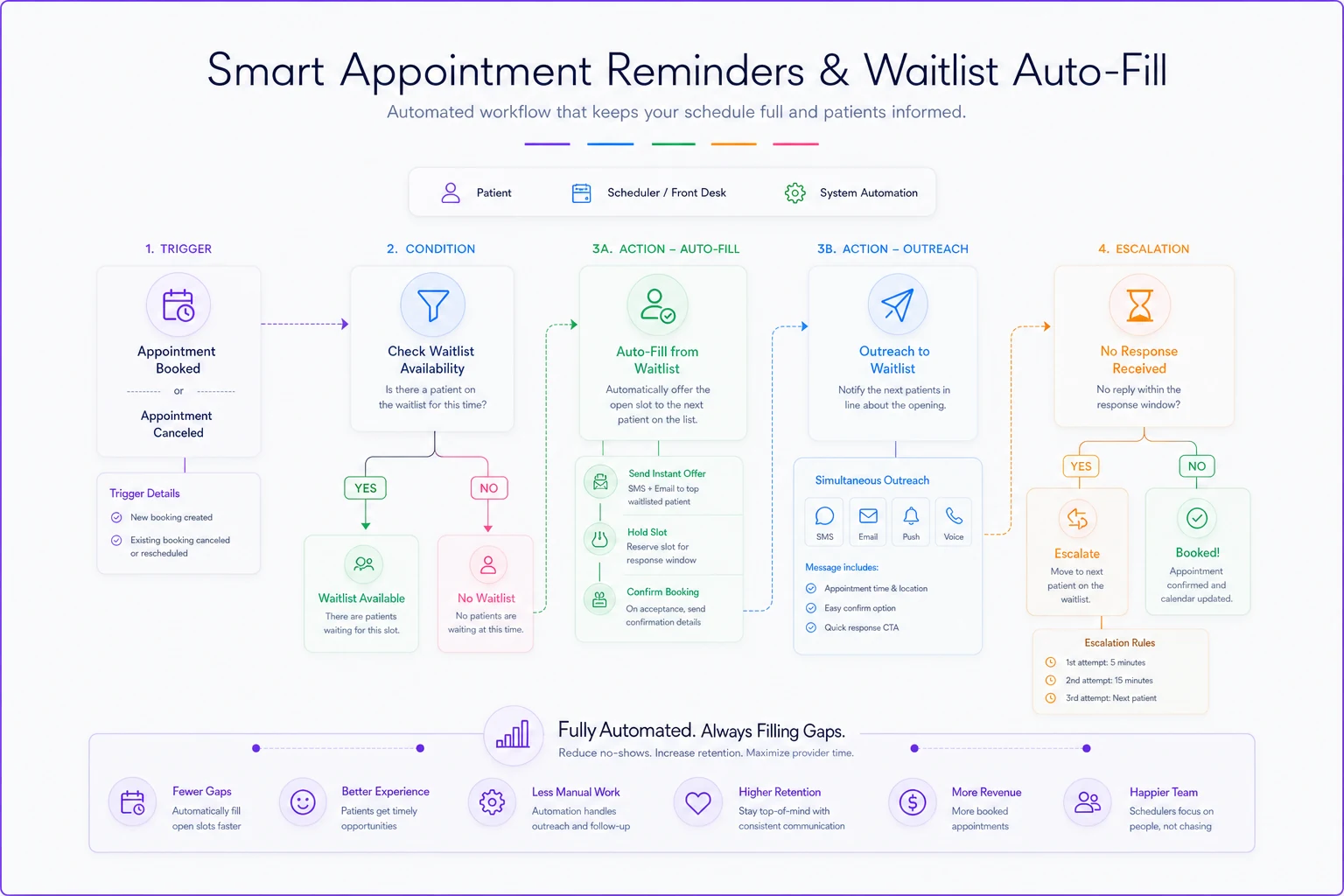
The value isn't the automation itself — it's that it enforces the SLA above without someone having to remember to do it.
Privacy and compliance controls to bake in
-
Never put clinical detail in SMS. "Your appointment with Dr. X on Tuesday" is fine; diagnosis is not.
-
Confirm messaging consent at intake and honor opt-outs automatically.
-
Restrict automation access to minimum-necessary data by role.
-
Log every automated message for your audit trail.
-
For card-on-file automations, keep card data in the processor vault, never in the clinic record.
For card-on-file automations, keep card data in the processor vault, never in the clinic record.
Sample scripts and templates
New patient confirmation (SMS):
"Hi [Name], you're booked with [Clinic] on [Date] at [Time]. Reply C to confirm or R to reschedule. Forms: [link]"
Waitlist offer (SMS):
"Hi [Name], an earlier slot just opened [Date/Time]. Reply YES to claim it — first reply gets it."
Copay-at-check-in (staff script):
"Your copay today is [$X], and I can take that now. Would you like to keep a card on file so future visits are quicker?"
Unsigned chart reminder (internal to provider):
"You have [N] charts open from [date]. These block billing — can you close them by end of day?"
Denial handoff (internal):
"Claim [#] denied for [reason]. Owner: [name]. Correct and resubmit by [date]."
Dashboard templates: daily huddle vs monthly ops
Daily huddle board (5 minutes, standing):
-
Yesterday's no-shows and same-day fills
-
Unsigned charts by provider
-
Today's schedule gaps
-
Any callouts or coverage changes
-
Yesterday's point-of-care collection rate
Monthly ops review (sit-down, 45 minutes):
-
Clean claim rate, denial rate, top denial reason
-
Days in A/R trend
-
Schedule utilization by provider
-
Overtime % and time-to-competency
-
One experiment to run next month
Keep the daily board to things you can actually fix today. The monthly review is for trends — the patterns that only reveal themselves across weeks.
Simple ROI worked examples
Same-day fill. Say you average roughly 40 cancellations a month and fill about 15% of them manually. At an average visit value near $85, that's around $510 recovered. Push the fill rate to 45% with the waitlist recipe and you're recovering closer to $1,500 — a swing of roughly $1,000 a month for a workflow change that costs nothing extra.
Unsigned chart sweep. A clinic sitting on 20 unsigned charts worth around $85 each has roughly $1,700 in unbillable revenue at any given moment. Tightening the sweep doesn't create new revenue — it stops cash from drifting into aged A/R where a portion of it never gets collected.
Point-of-care collection. Move from collecting about 60% of copays at the desk to around 85%, on a clinic seeing roughly 330 visits a month with a $25 average copay, and you're pulling in close to $2,000 more monthly that you'd otherwise chase by mail — at real cost and lower recovery rates.
None of these require more patients. They're all leakage you already have.
Telehealth-specific notes
Scheduling: tag telehealth slots distinctly so coverage math stays accurate — a telehealth block doesn't need a treatment room but does need provider time.
-
Consent capture telehealth consent at booking, not at the visit, and store it in the chart.
-
Documentation note the modality and that the visit was conducted via telehealth; it affects coding.
-
Billing confirm payer telehealth coverage during eligibility — rules shift and assuming coverage is how telehealth denials pile up.
-
Reminders send the join link in the reminder, and resend 15 minutes before the visit. The number one telehealth no-show cause isn't forgetting the appointment — it's not finding the link.
The number one telehealth no-show cause isn't forgetting the appointment — it's not finding the link.
Where software quietly does the heavy lifting
You can run every SOP above on paper and a whiteboard. Plenty of clinics do. Where it gets hard is enforcement — remembering to run the unsigned-chart sweep every single day, contacting three waitlist patients within the first 15 minutes, holding a claim the moment a note doesn't match.
That's the layer where an operational platform with built-in automation earns its keep. Not by replacing judgment, but by firing the trigger on time, every time, and logging it so your KPIs calculate themselves instead of being reconstructed by hand at the end of each month. The SOP defines what should happen; automation makes sure it actually happens when everyone's slammed on a Tuesday afternoon.
Start with one system. Most clinics get the fastest, most visible win from the scheduling and same-day fill checklists — the money recovered shows up within the first month and funds the patience to roll out everything else. Print the checklists, assign the owners, agree on the KPI formulas so everyone's measuring the same thing, and review the numbers on the cadence listed.
The clinics that scale aren't the ones with the fanciest tools — they're the ones where the boring checklist runs the same way whether the owner is in the building or not.
Ready to streamline your chiropractic clinic operations?
Join 1,200+ clinics using Spinesly to save time, reduce scheduling errors, and improve patient care experiences.