

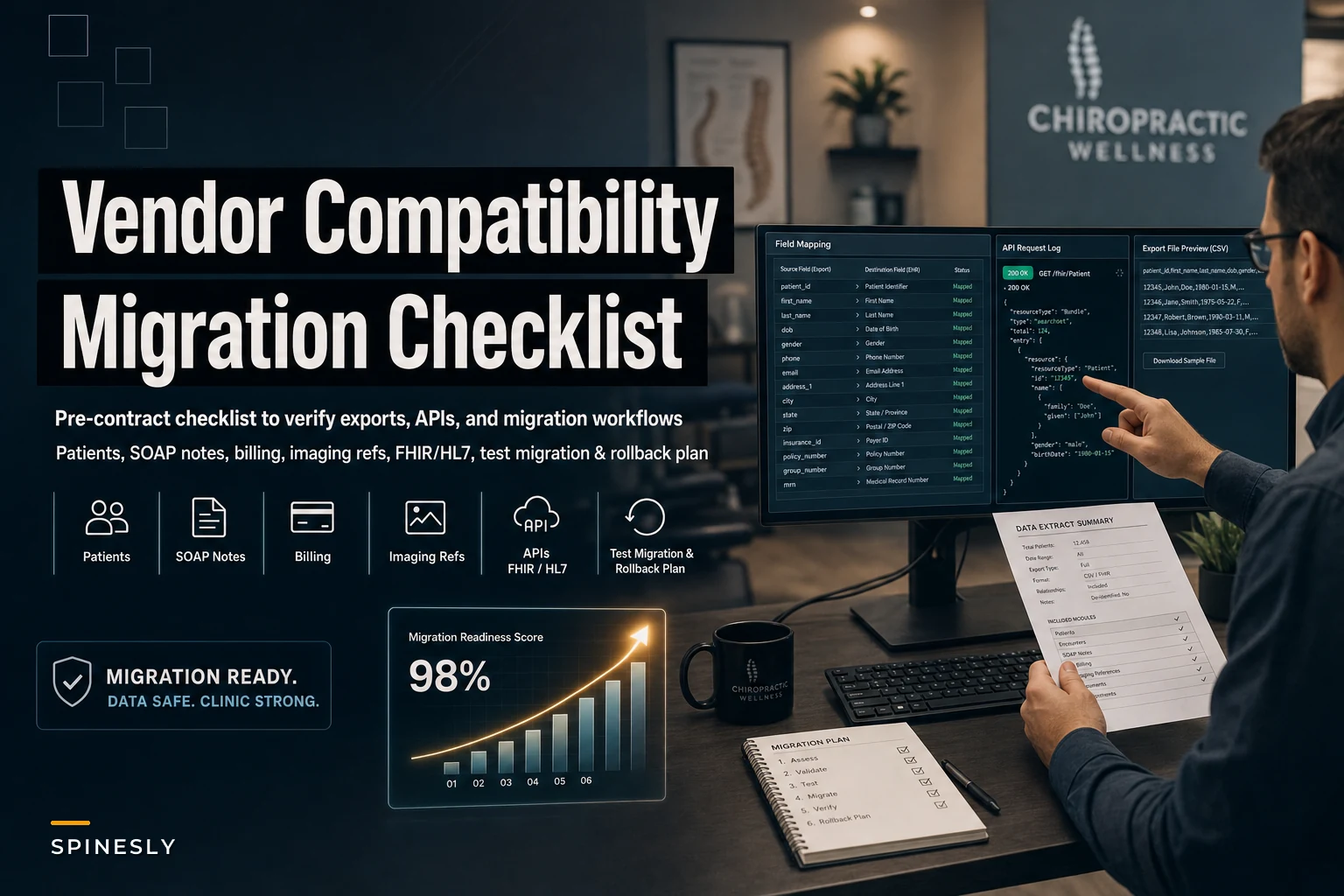

Most clinic owners pick a new PM system based on the demo. The interface looks clean, the billing dashboard is nicer than what they have, the rep is friendly — contract signed. Then migration day arrives and someone discovers the old system can only export patient demographics and the last 18 months of ledger data, while SOAP notes come out as a locked PDF blob with no structure. Suddenly the "two-week migration" becomes a three-month archaeology project.
The compatibility and portability questions are the part of vendor selection that almost nobody pressure-tests properly. This guide stays narrow on purpose: no feature comparisons, no pricing debates. Just the specific things you need to confirm about data formats, APIs, and integration points — and the exact deliverables to demand before the contract is signed, not after. Once you've chosen a vendor, the execution side is covered in our data‑migration and go‑live checklist; this article is about what you verify during selection so that execution actually goes smoothly.
Start From the Exit, Not the Entrance
The most useful mental shift you can make: evaluate your current system's export capability before you evaluate the new system's import capability. Both matter, but the bottleneck is almost always the old vendor.
Here's the pattern that burns people. The new vendor says, "We can import anything — just give us a CSV." That's technically true and completely misleading. The new system can accept a lot, but your old system decides how much it releases and in what shape. A well-known legacy chiropractic PM might export a clean patient table and a decent transaction ledger, but render clinical notes as rendered documents rather than discrete fields. If your notes come out unstructured, no import routine will reconstruct the diagnosis codes, regions adjusted, or plan-of-care fields back into a queryable format.
So the first move during selection is to request a full export specification from your current vendor — not a sales promise, the actual documented list of what each export contains, field by field. If your current vendor stalls on this, that itself tells you something about how the offboarding will go.
The Data Objects That Must Survive the Move
Not all data is equal. Some objects are legally or clinically non-negotiable; others are nice to have. Prioritizing this upfront means that during a tight migration window, you're protecting what actually matters instead of scrambling over everything at once.
Never miss another patient appointment.
Spinesly helps you schedule, confirm, and manage every patient visit efficiently.
- Unified appointment management
- Automated patient reminders
- Staff and resource scheduling
No credit card required
Here's the priority order, roughly tiered by how damaging a loss would be:
Tier 1 — Cannot lose, must be structured:
-
Patient demographics and identifiers (including the original patient ID so you can map relationships later)
-
Encounters / SOAP notes with discrete fields where possible — date of service, provider, regions treated, diagnosis codes, CPT codes
-
Billing and insurance claims history — charges, payments, adjustments, claim status, payer, dates
-
Appointment history — not just future appointments, but the historical record that drives recall logic and no-show patterns
Tier 2 — Needs to migrate, some fidelity loss tolerable:
-
Treatment plans / care plans — remaining visits, authorized units, plan start/end
-
Provider credentials and NPI data — needed for clean claim submission from day one
-
Insurance authorizations — especially open prior-auths with remaining visits
Tier 3 — Reference-level, can be linked rather than imported:
-
Imaging references — you're usually migrating pointers (accession numbers, study dates, PACS links), not the DICOM files themselves
-
Scanned documents — intake forms, signed consents, correspondence
-
Patient communication logs
The mistake clinics make constantly is obsessing over migrating every scanned PDF from 2014 while under-specifying how open claims and authorization units transfer. The scanned forms can live in an archive. An open prior-auth with four remaining visits that doesn't carry over means a denied claim and a confused front desk three weeks after go-live.
Request source IDs in the sample extract to make reconciliation trivial.
One underrated Tier 1 item: the original patient and visit IDs. If the export drops the source system's primary keys, you lose the ability to reconcile what migrated against what didn't. Always request that source IDs are preserved as a reference field in the new system.
Export Formats: What "We Support Exports" Actually Means
When a vendor says they support exports, make them specify the format per data object, because the format determines how much structure survives.
| Format | Good for | Watch out for |
|---|---|---|
| CSV | Demographics, ledgers, appointment tables, flat lists | No nested structure; SOAP notes forced into CSV lose formatting and field separation |
| XML | Structured records with hierarchy (encounters with sub-fields) | Verbose; schema varies wildly between vendors — ask for the schema definition |
| JSON | API-based transfers, nested clinical records | Only useful if the new system can parse the specific structure |
| HL7 v2 | Clinical messages, lab/imaging interfaces, ADT feeds | Older but widely supported; good for interop, not bulk history dumps |
| FHIR | Modern structured clinical and administrative data | Best-case for portability — but confirm which resources are supported, not just "FHIR-compatible" |
The phrase to distrust is "FHIR-compatible." FHIR has dozens of resource types. A vendor supporting the Patient and Appointment resources but not Encounter or Claim is technically FHIR-compatible and practically useless for clinical history. Ask: "Which specific FHIR resources can you export, and which can you import?" Get that list in writing.
For most chiropractic migrations, the realistic shape is: CSV for demographics, ledgers, and appointments; structured XML, JSON, or FHIR for encounters and claims; HL7 or direct links for imaging and lab interfaces. If a vendor can only give you flat CSV for everything including clinical notes, assume your SOAP history arrives as a text dump and plan your archiving strategy accordingly.
API Capabilities Worth Confirming
Even if you're doing a one-time bulk migration, API quality matters for two reasons: it's how you'll reconcile and correct data after go-live, and it's how every future integration — patient portal, reporting, payment reconciliation — will function.
-
REST API availability with documented endpoints for the core objects — patients, appointments, encounters, claims. Ask for a link to the live API docs, not a PDF summary.
-
OAuth2 authentication rather than static API keys passed in URLs. If a vendor is still handing out permanent plaintext keys, that's both a security concern and a sign of an aging platform.
-
Batch / bulk endpoints for reading large volumes. An API that only returns 50 records per call with aggressive rate limits turns a reconciliation job into a weekend of babysitting scripts.
-
Write access, not just read. Some vendors expose read-only APIs, which means you can pull data but never programmatically correct or sync it. For migration cleanup, write access on at least demographics and appointments is valuable.
-
Rate limits and pagination behavior in writing. "We have an API" means nothing if it throttles to a trickle.
A practical test: ask the vendor to let your technical person — or a contractor — hit the sandbox API and pull a sample set during evaluation. Vendors with genuinely good APIs say yes quickly. The ones that get evasive usually have documentation that doesn't match reality.
Integration Points That Break Silently
Migrations rarely fail on the patient table. They fail at the seams — the connections to outside systems that nobody tested until a claim bounced or an image wouldn't load.
PACS / imaging. You're linking to studies, not usually moving them. Confirm how the new system references imaging — accession number, DICOM query/retrieve, or a simple stored URL. If your current workflow relies on one-click access from inside the chart, verify that link survives migration or gets re-established. A broken imaging link means the provider is hunting for X-rays mid-visit.
Clearinghouse. This is the quiet killer. Your claims route through a clearinghouse, and the new PM needs to connect with the right payer enrollments, submitter IDs, and ERA setup. The dangerous assumption is that because the clearinghouse is the same, the connection is automatic. It isn't — re-enrollment and ERA re-setup can take weeks with some payers. Confirm with the new vendor exactly which clearinghouses they support and ask for their typical payer enrollment timeline. This is frequently the longest part of the whole migration.
Patient portal. If patients currently log in to book, pay, or complete intake, understand that portals almost never migrate credentials. Patients will re-register. Plan the communication around that. More importantly, confirm that historical portal data — completed intake forms, signed consents — exports into the new chart rather than vanishing when the old portal is decommissioned.
A Realistic Scenario
A two-provider clinic running roughly 320–360 visits a month decided to switch platforms, mostly for better scheduling. During selection they asked all the right feature questions and almost none of the portability ones.
What surfaced after signing: their old system exported SOAP notes only as merged PDFs, so about six years of structured clinical history became flat documents. Appointment history exported fine, but open prior-authorizations didn't carry a "remaining units" field, so the front desk had to manually rebuild roughly 40 active authorizations by pulling them one at a time. And clearinghouse re-enrollment for two of their larger payers took close to five weeks, during which claims to those payers queued up unsubmitted.
The visible damage was a stretch of delayed claims — a few thousand dollars in temporarily stuck A/R — plus a tired staff doing manual auth rebuilds for a month. None of it was catastrophic, but all of it was avoidable. Every one of those problems was knowable before the contract if the right export sample and timeline questions had been asked. The demo tells you how the system looks; the export sample tells you how the migration will actually feel.
Sample Vendor Questions to Put in Writing
Don't ask these verbally and trust the answers. Put them in your RFP or email and require written responses.
-
"Provide a complete export specification listing every data object and the format for each."
-
"Which specific FHIR resources (or HL7 message types) can you export and import?"
-
"Do SOAP notes export as structured, discrete fields or as rendered documents?"
-
"Are original source patient IDs and visit IDs preserved as reference fields on import?"
-
"What is your typical clearinghouse and payer re-enrollment timeline?"
-
"Does your REST API use OAuth2, and does it include batch endpoints with documented rate limits?"
-
"Can we access a sandbox/API during evaluation to test a sample pull?"
-
"How are imaging references handled — stored links, accession numbers, or DICOM Q/R?"
-
"Do open prior-authorizations migrate with remaining-units values intact?"
The quality of the answers tells you as much as the content. Specific, documented responses signal a vendor that has done real migrations. Vague reassurance signals one that will improvise on your data.
The Pre‑Contract Deliverable Template
This is the part most clinics skip, and it's the part that prevents the worst surprises. Before you sign, require two tangible deliverables from the incoming vendor — written into the agreement if possible.
Deliverable 1 — Data Extract Sample
-
At least 20–30 real patient records with demographics
-
A set of encounters/SOAP notes showing how clinical fields land in the new structure
-
A sample of billing/claims records with payer, status, and balance
-
Appointment history for those sample patients
-
At least a few treatment plans and open authorizations
-
A field-mapping document showing source field → destination field for each object
When you get this sample, the thing to check isn't whether data arrived — it's whether structure arrived. Open a migrated SOAP note. Are the regions, codes, and plan fields discrete and searchable, or is it one wall of text? That answer predicts your entire clinical-data experience post-migration.
Deliverable 2 — Test Migration Plan
-
Scope — which objects migrate, which get archived, which are re-entered manually
-
Sequence — the order objects migrate and dependencies between them
-
Reconciliation method — how you'll verify record counts and spot-check accuracy
-
Clearinghouse and payer re-enrollment timeline with named payers
-
Portal transition plan and patient communication
-
A defined test window where a copy of migrated data is validated before go-live cutover
-
Rollback or fallback plan if validation fails
If a vendor won't produce a test migration plan before contract, that's one of the clearest red flags in the whole process. Good migration partners want a test run; it protects them as much as you.
Here's a concise workflow for the test migration plan.
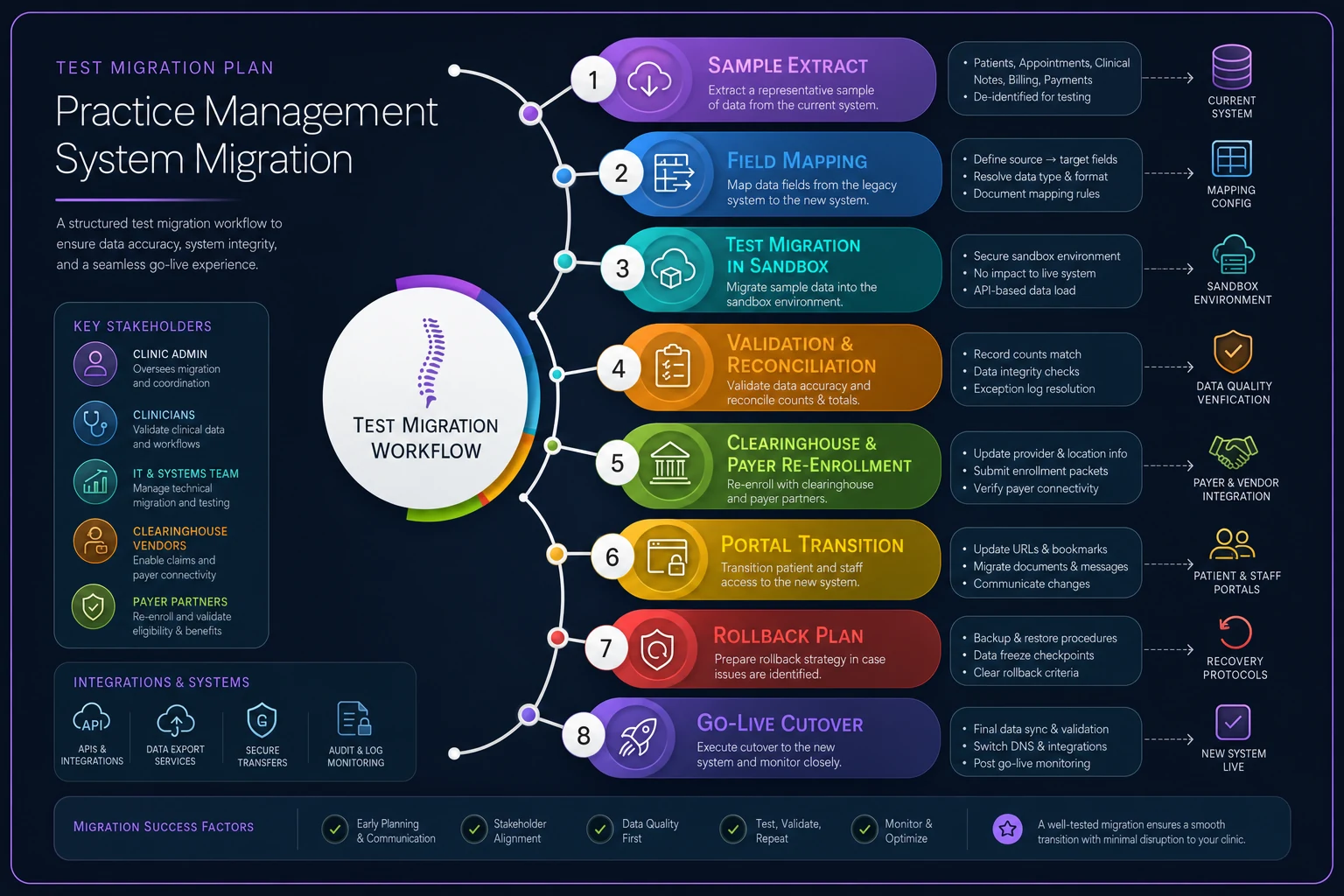
Use this as a simple visual aid when discussing sequencing and responsibilities with the vendor.
Timelines and Red Flags
Rough expectations for a small-to-mid chiropractic clinic, so you can tell normal from concerning:
-
Export spec and sample extract days to a couple of weeks
-
Test migration and validation two to four weeks
-
Clearinghouse / payer re-enrollment two to six weeks (often the long pole — start early)
-
Full migration and go-live typically 6–12 weeks end to end, depending on data volume and integration count
Red flags that should slow you down:
-
Vendor can't or won't provide a written export specification
-
"FHIR-compatible" with no resource-level detail
-
SOAP notes only available as PDFs or image renders
-
No sandbox API access during evaluation
-
No sample extract against real data
-
Refusal to commit to a test migration before contract
-
Vague clearinghouse timelines ("it's usually quick")
-
Read-only API with no batch endpoints
-
Source IDs dropped on import
Any one of these isn't automatically disqualifying. Three or four together means you're looking at a painful migration regardless of how good the software looks in the demo.
When This Level of Rigor Is Overkill — and When It Isn't
If you're a brand-new clinic with a few months of data, most of this is more process than you need. A straightforward demographics-and-appointment migration is genuinely low risk.
The deep portability scrutiny earns its keep when you have years of clinical history, meaningful open A/R, active authorizations, and integrations you depend on daily. It's also critical for multi-provider practices where a stalled clearinghouse connection or a batch of lost authorizations multiplies across providers fast. The more visits and claims flowing through your system, the more a quiet migration gap compounds into real revenue sitting in limbo.
Bringing It Together
Vendor selection for a chiropractic PM system isn't really about which dashboard looks best. On the migration side, it comes down to chiropractic practice management software migration compatibility: whether your data can leave the old system intact and land in the new one with structure, whether the APIs and integrations will hold, and whether the vendor will prove it before you commit rather than after.
The clinics that migrate smoothly are the ones that treated the sample extract and test migration plan as hard requirements, verified structure instead of trusting promises, and started the clearinghouse enrollment clock early. Get those deliverables in hand before you sign, then move into execution. Once you've selected the right vendor and confirmed these compatibility details, the step-by-step data‑migration and go‑live checklist walks you through the actual cutover so nothing falls through the cracks on go-live day.
The clinics that migrate smoothly are the ones that treated the sample extract and test migration plan as hard requirements, verified structure instead of trusting promises, and started the clearinghouse enrollment clock early. Get those deliverables in hand before you sign, then move into execution. Once you've selected the right vendor and confirmed these compatibility details, the step-by-step data‑migration and go‑live checklist walks you through the actual cutover so nothing falls through the cracks on go-live day.
Ready to streamline your chiropractic clinic operations?
Join 1,200+ clinics using Spinesly to save time, reduce scheduling errors, and improve patient care experiences.