



Most clinics buy practice management software backwards. They sit through four demos, fall in love with the one that had the slickest scheduling calendar, sign a 36-month contract, and then discover the SOAP note templates don't match how their providers actually document, or that batch billing requires a separate module nobody mentioned.
The problem isn't that these clinics are careless. It's that they evaluated vendors on vibes instead of running a structured selection process tied to their own workflows. A vendor demo is a sales presentation. It shows you the software's best 20 minutes — not what month three looks like when your front desk is juggling walk-ins, your billing person is chasing a denied 98941, and a provider is trying to close out notes between adjustments.
This piece covers the selection half of the decision — how to shortlist, score, and interrogate vendors before you commit. It deliberately stops short of implementation. Once you've picked a vendor and need to actually move your data and go live, the Switch Practice Management Safely data-migration and go-live checklist covers that stage in detail. Keep the two separate. Mixing selection criteria with migration mechanics is exactly how buyers lose the thread and end up comparing feature lists instead of fit.
Start with your workflows, not their features
Before you open a single vendor website, write down how your clinic actually operates. Not the idealized version — the real one. How does a new patient get from phone call to first adjustment? Who touches the chart? When does a copay get collected? How does a denied claim get worked, and by whom?
A useful example: a two-provider clinic with one front-desk person and an outsourced biller. Their real bottleneck isn't scheduling — it's that insurance verification happens inconsistently, so maybe one in six new patients shows up with coverage that doesn't cover chiropractic. Any software that doesn't make eligibility checks fast and visible is going to make their worst problem worse, no matter how clean the calendar looks.
Time one full patient journey from first call to checkout to surface hidden steps and exceptions.
When you anchor the evaluation to your workflows, the demos change character. Instead of nodding along while a salesperson clicks through features, you're saying: "Show me exactly how a provider documents a re-exam visit with updated goals, then bills it, without leaving the chart." If they hesitate, you've learned something.
Build the RFP around four workflow pillars
You don't need a 40-page corporate RFP. For a clinic, a tight request-for-proposal built around four workflow pillars will surface 90% of what matters. Send the same document to every shortlisted vendor so you're comparing answers to identical questions.
Never miss another patient appointment.
Spinesly helps you schedule, confirm, and manage every patient visit efficiently.
- Unified appointment management
- Automated patient reminders
- Staff and resource scheduling
No credit card required
-
Scheduling & patient flow — recurring care plans, multi-provider calendars, waitlist handling, online self-booking, appointment reminders, and no-show tracking.
-
Clinical documentation (SOAP) — chiropractic-specific templates, macros, re-exam workflows, outcome measure capture, and how fast a provider can close a note.
-
Billing & RCM — CPT/ICD support, claim scrubbing, ERA posting, patient statements, superbills, and reporting on denials and A/R aging.
-
Integrations & data — payment processing, clearinghouse, imaging, outcome tools, and — critically — data export in a usable format if you ever leave.
A vendor questionnaire you can copy
Drop these into your RFP under each pillar. Make vendors answer in writing, not in a demo, so you have something to hold them to later.
Scheduling
-
Can recurring care plans (e.g., 3x/week for 4 weeks, tapering) be auto-generated and adjusted in bulk?
-
How are multi-provider and multi-location calendars handled on one screen?
-
What's included in reminders — SMS, email, voice — and is it metered or flat-rate?
-
Can patients self-schedule only into provider-approved slot types?
SOAP notes
-
Are templates chiropractic-specific out of the box, or do we build them?
-
How many clicks/seconds to document a routine established-patient visit?
-
Can notes be amended after signing, with an audit trail?
-
Are outcome measures (e.g., Oswestry, NDI) built in and trendable?
Billing
-
Is claim scrubbing included or a paid add-on?
-
Which clearinghouses do you support natively?
-
Can we run A/R aging and denial-reason reports without exporting to Excel?
-
How are secondary claims and crossover handled?
Integrations & data portability
-
Which payment processors integrate, and are we locked into one?
-
On termination, what data do we get, in what format, and at what cost?
-
Is there an API, and what does it actually expose?
That last pillar is where clinics get burned. Vendors love to talk about importing your data in. Ask the harder question about getting it out. A vendor who charges extra or stalls on export is showing you how the relationship ends before it begins.
Here's a simple visual of the RFP workflow to keep reviewers aligned.
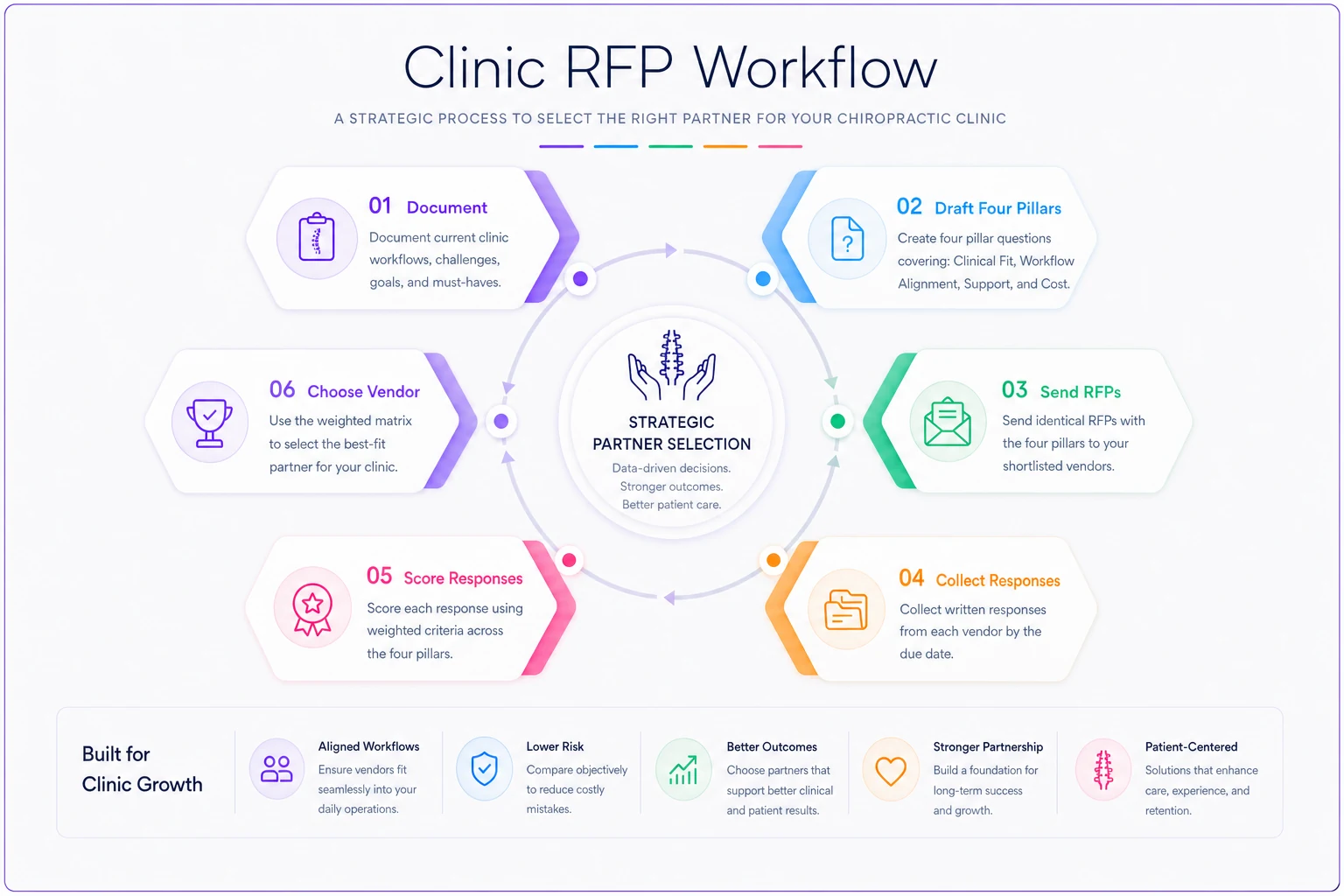
Keep the questionnaire consistent so you're scoring apples-to-apples across vendors.
Score vendors with weights that match your clinic
A scoring matrix stops you from being swayed by whichever demo you saw most recently. But a generic matrix is worthless — the weights have to reflect your clinic's size and revenue model. A cash-based wellness practice and an insurance-heavy clinic should not weight billing the same way.
Score each vendor 1–5 on each category, multiply by your weight, and total it. Here's how the weighting shifts by clinic type:
| Category | Solo cash-based | Small insurance-heavy (2–4 providers) | Multi-location group |
|---|---|---|---|
| Scheduling & patient flow | 25% | 20% | 25% |
| SOAP documentation speed | 25% | 20% | 15% |
| Billing & RCM depth | 10% | 30% | 25% |
| Reporting & analytics | 10% | 10% | 15% |
| Integrations & API | 10% | 10% | 15% |
| Data portability | 10% | 5% | 5% |
| Support & onboarding | 10% | 5% | — |
The solo cash practice weights documentation and data portability high — they live in the chart and they're likely to switch tools again as they grow. The insurance-heavy clinic leans hard into billing because a 3% difference in clean-claim rate across a few hundred claims a month is real money. The group practice spreads weight toward integrations and reporting because coordination across locations is where things actually break.
Fill this in independently — have the owner, the lead provider, and the billing person each score separately, then compare. When one person rates a vendor a 5 on billing and another rates it a 2, that gap is worth a conversation before you sign anything.
Separate must-haves from nice-to-haves before the demos
The most useful hour you can spend before any demo is sorting features into two buckets. Must-haves are deal-breakers — if the software can't do it, it's out regardless of price. Nice-to-haves are tiebreakers.
The mistake clinics make is inflating the must-have list until everything is on it, which means nothing actually is. Be ruthless. A feature is only a must-have if its absence forces a daily manual workaround.
Typical must-haves for an insurance-based chiropractic clinic:
-
Chiropractic-specific SOAP templates with macro support
-
Integrated eligibility verification
-
Claim scrubbing before submission
-
ERA auto-posting
-
A/R aging and denial-reason reporting
-
Secure patient communication (reminders + two-way messaging)
-
Clean data export on exit
Common nice-to-haves:
-
Patient self-scheduling
-
Built-in outcome-measure tracking with trend graphs
-
Automated recall/rebooking campaigns
-
Retail/supplement POS
-
Patient portal with intake forms
-
Telehealth module
The honest test: for every item on your must-have list, finish the sentence "if this is missing, we will have to by hand, every single day." If you can't complete that sentence convincingly, it belongs in the nice-to-have column.
The pricing and contract questions vendors hope you skip
Published pricing is almost never the real price. The sticker number covers the base platform, and the things you assumed were included — claim scrubbing, SMS reminders, extra user seats, premium support, the clearinghouse connection — stack on as line items.
A clinic that budgeted roughly $300/month ends up closer to $550–$650 once texting, a second provider seat, and the billing module are added. That's not necessarily a bad deal — but it's a different deal than the one they thought they were signing.
-
What is the all-in monthly cost for our exact configuration — provider count, locations, and every module we flagged as a must-have?
-
What's metered? Reminders, statements, claims, storage — anything priced per-unit can balloon as you grow.
-
What's the implementation/onboarding fee, and what does it include?
-
What's the contract term and auto-renewal clause? Can you negotiate month-to-month or a 12-month term instead of 36?
-
What's the price-increase cap at renewal? Uncapped renewals are how a good deal becomes a bad one in year two.
-
What does cancellation cost, and what's the data-export fee on exit?
On negotiation: the two levers that actually move are term length and onboarding fees. Vendors will often waive or halve the implementation fee to close, and they'll discount monthly rates for a longer commitment — but only take the longer term if you've done real diligence, because you're trading flexibility for savings. Getting a renewal price cap written in is worth more than a small monthly discount. Nobody negotiates year-two pricing, which is exactly why vendors raise it.
The data-mapping questions that prevent migration disasters
You're still in selection here — not migrating yet — but the questions you ask about data now determine whether your eventual switch is smooth or a six-week nightmare. Ask these during evaluation, because the answers should influence which vendor you pick.
-
What fields do you map on import, and which ones get dropped? Patient demographics usually transfer cleanly. Clinical history, treatment plans, and old ledger balances are where data gets lost.
-
Do historical SOAP notes come over as structured data or flat PDFs? Flat PDFs mean you can read old notes but can't report or trend on them.
-
How are outstanding A/R balances handled? If open claims and patient balances don't migrate accurately, you'll be reconciling two systems for months.
-
What does a test migration look like? A vendor confident in their process will run a sample migration so you can verify before cutover.
-
Who validates the migrated data — you or them — and what's the sign-off process?
The detailed mechanics of executing the move, validating record counts, and sequencing go-live are covered in the Switch Practice Management Safely checklist. But raise these questions during selection. Vague answers now mean painful surprises later.
Red flags that should end a conversation
Some signals are worth walking away over, even if the software looks great:
-
They won't quote an all-in price in writing. If every number is "it depends, let's talk," they're setting up to upsell you after you're committed.
-
Data export is expensive, slow, or deliberately vague. A vendor who makes leaving hard is betting you won't be happy enough to stay without a lock-in.
-
"Chiropractic-specific" turns out to mean a generic medical template. Ask them to show you an actual chiropractic re-exam note. If a provider wouldn't recognize it, it's marketing.
-
No test migration offered. Moving years of patient data on faith is how clinics lose balances and history.
-
Support is only email or ticket-based with no phone option during business hours. When your scheduler is down at 9 a.m. on a Monday, a ticket queue doesn't help.
-
Auto-renewal with uncapped increases and a long cancellation notice. This combination quietly traps clinics in deals that get worse every year.
One red flag isn't always disqualifying. Two or more, and you should be looking elsewhere.
A real scenario: how structured scoring changed the pick
A three-provider clinic — mostly insurance with some cash wellness plans, running around 340–380 visits a week — was set on a well-known platform after a strong demo. The scheduling interface was clean and everyone liked it.
When they ran the weighted matrix with billing at 30% (because that's where their revenue actually lived), the favorite scored well on scheduling and documentation but mediocre on claim scrubbing and denial reporting — both features they'd need every single day. A less flashy competitor scored lower on the calendar but significantly higher on billing depth and offered a free test migration with written data-export terms.
They almost ignored the matrix because the first vendor just felt better. Then the billing person pointed out they were working around 15–20 preventable denials a month on the current system, and weaker scrubbing would keep that problem alive. The all-in pricing comparison also surprised them — the flashier option came in roughly $150/month higher once reminders and the billing module were added.
They went with the higher-scoring vendor. Six months in, their clean-claim rate improved enough that the billing person stopped doing Friday afternoon denial cleanup as a standing task. Not a dramatic transformation — just the right tool matched to the workflow that actually mattered, caught by a scoring process instead of a demo impression.
When a rigorous RFP is overkill
Not every clinic needs this full process. A brand-new solo cash practice with no existing data to migrate and simple needs can reasonably pick a well-reviewed option and move on — the switching cost later is low because there's little to move. The RFP effort pays off most when you have real data to migrate, insurance complexity, multiple providers, or you're locking into a multi-year contract.
If you're spending more time building the scoring matrix than you'd spend switching again in a year, you've overshot. Match the rigor to the stakes.
Pulling it together
Choosing chiropractic practice management software goes wrong when the decision is driven by demo polish instead of workflow fit. The fix isn't complicated — it's just disciplined. Write down how your clinic really runs, send every vendor the same workflow-based questionnaire, score them with weights that reflect your size and revenue model, sort features honestly into must-haves and nice-to-haves, and press hard on pricing, contract terms, and data portability before you sign.
Do that, and the vendor who wins is the one that fits your clinic — not the one with the best Tuesday-afternoon sales pitch. Then, and only then, move into the actual switch using the data-migration and go-live checklist, so the tool you chose carefully gets implemented just as carefully.
Do that, and the vendor who wins is the one that fits your clinic — not the one with the best Tuesday-afternoon sales pitch. Then, and only then, move into the actual switch using the data-migration and go-live checklist, so the tool you chose carefully gets implemented just as carefully.
Ready to streamline your chiropractic clinic operations?
Join 1,200+ clinics using Spinesly to save time, reduce scheduling errors, and improve patient care experiences.