

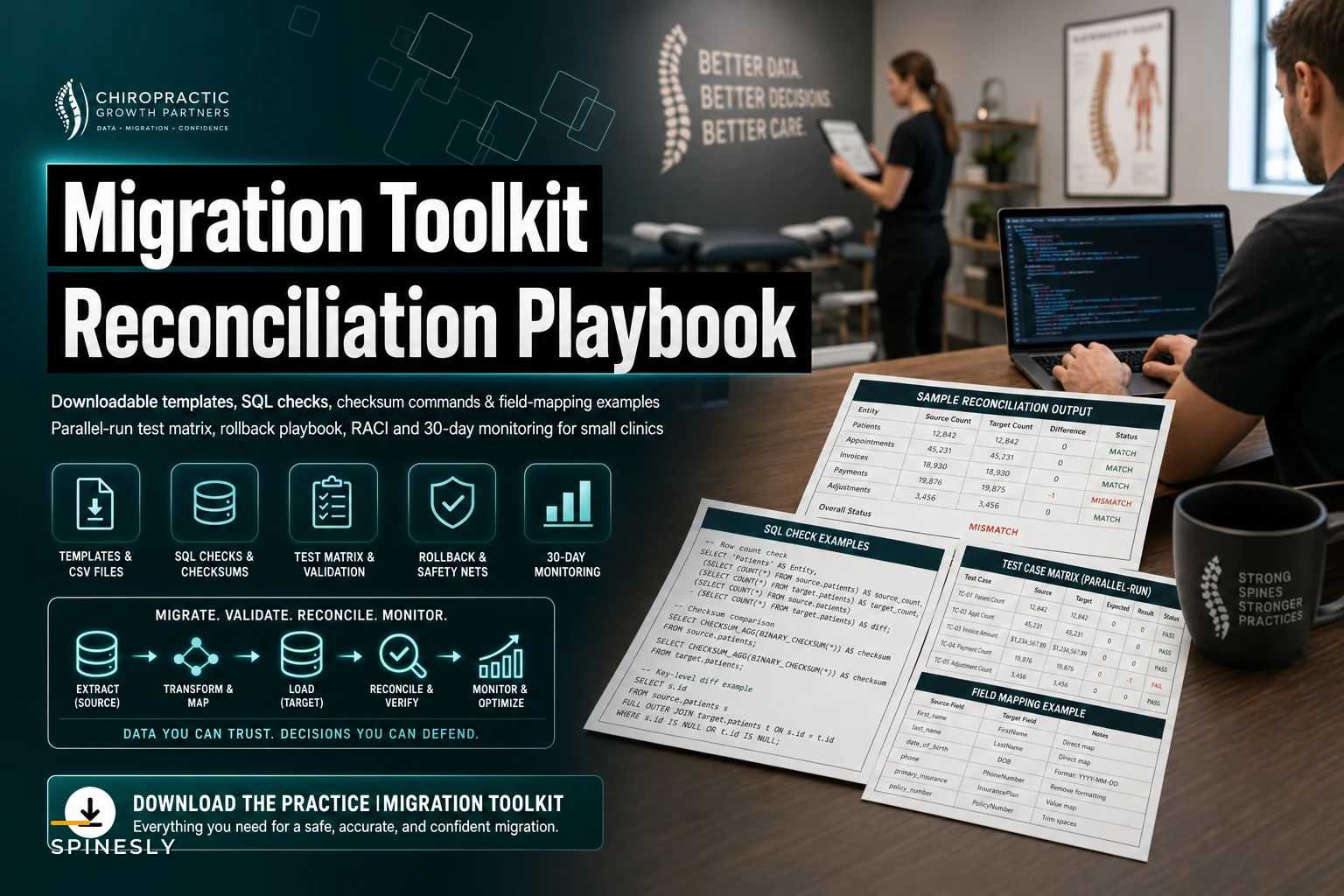

Most migration guides tell you what to do. They rarely hand you the actual CSV header rows, the SQL you'll run at 11pm to prove balances match, or the exact sequence for flipping your clearinghouse back to the old system when go‑live goes sideways. This is the companion toolkit — the part you print, fill in, and keep open on a second monitor during cutover.
If you haven't already built your project plan, pair this with the broader Switch Practice Management Safely data‑migration and go‑live checklist. That covers sequencing and governance. This covers artifacts: field maps, test cases, reconciliation queries, rollback steps, and the 30‑day monitoring matrix.
One thing worth saying upfront about how clinics actually fail here — it's almost never the "big" data. Demographics usually move cleanly. The damage happens in the seams: a payer ID mapped to the wrong plan, a payment plan that lost its remaining balance, superbill attachments that got orphaned, or an audit log nobody exported because it wasn't on anyone's radar. The templates below exist because those seams are predictable.
1. CSV Field‑Mapping Templates
Vendors export in their own shapes. The job is translating their columns into the new system's import columns without silent data loss. Below are starter header rows for the objects that cause the most post‑go‑live pain. Treat the "notes" column as your validation rules.
Users / Roles
``
sourceuserid,fullname,loginemail,role,npi,licensenumber,licensestate,activeflag,providerschedulable,defaultfacilityid,notes
``
-
- role must map to an exact value the new system accepts (e.g.,
Provider,FrontDesk,Biller,Admin). Free‑text roles break SSO group mapping. -
- active_flag — don't import terminated staff as active. A common mistake is migrating historical users and leaving all of them schedulable.
-
- provider_schedulable separates billing‑only providers (supervising docs) from those who actually hold a calendar.
Providers / NPIs
``
sourceproviderid,fullname,individualnpi,groupnpi,taxonomycode,enrolledpayers,feeschedule_id,notes
``
The trap here is the individual vs. group NPI mix. If claims go out under the wrong NPI after cutover, you won't see it until the first remits bounce 10–14 days later. Verify each provider's individual_npi against the NPPES record before import, not after.
Payer IDs
``
sourcepayerid,payername,newclearinghousepayerid,plantype,eligibilitypayerid,claimspayerid,eraenrolled,notes
``
-
- Clearinghouse payer IDs almost never match between vendors. This is the single highest‑risk mapping file.
-
-
eligibilitypayeridandclaimspayeridare frequently different for the same payer. Don't assume one value covers both. -
-
era_enrolledtells your biller which payers need re‑enrollment for electronic remits — this takes weeks, so start before cutover.
Facilities / Locations
``
sourcefacilityid,facilityname,npi,address,city,state,zip,placeofservice,taxid,defaultposfor_telehealth,notes
``
Place of service codes travel badly. A clinic running both in‑office (11) and telehealth (02/10) visits should confirm the default POS per location explicitly.
Payment Plans
``
sourceplanid,patientid,originalamount,amountpaid,remainingbalance,installmentamount,frequency,nextduedate,cardonfiletoken,status,notes
``
This is the file people get wrong and don't notice for a month. Export remaining_balance as a hard number — don't trust the new system to recalculate from history. And tokens for cards on file almost never port between processors, so flag every plan that needs a re‑capture.
Superbills / Encounters
``
sourceencounterid,patientid,providerid,dos,cptcodes,icdcodes,modifiers,units,chargeamount,allowedamount,paidamount,adjustment,patientresponsibility,claim_status,notes
``
Keep cpt_codes and modifiers as separate columns from the start. The number of migrations where modifiers get crammed into the CPT field and then silently dropped is higher than it should be.
Audit Logs
``
eventtimestamp,userid,eventtype,objecttype,objectid,fieldchanged,oldvalue,newvalue,ip_address,notes
``
Most clinics skip this entirely. Then an audit or a dispute arrives and the old system's been decommissioned. Even if the new platform can't import audit history, export it to immutable storage before you shut anything off.
Attachments
``
sourceattachmentid,patientid,encounterid,filename,filetype,filesizebytes,checksumsha256,storagepath,upload_date,notes
``
Attachments get their own migration strategy below — the CSV is just the manifest you reconcile against.
2. Test‑Case Matrix (With Owners and Pass/Fail Criteria)
A test matrix without named owners is a wish list. Assign a human to every row. Here's a working subset — expand it to cover your actual workflows.
Never miss another patient appointment.
Spinesly helps you schedule, confirm, and manage every patient visit efficiently.
- Unified appointment management
- Automated patient reminders
- Staff and resource scheduling
No credit card required
| ID | Test Case | Owner | Steps | Pass Criteria | Fail Trigger |
|---|---|---|---|---|---|
| T‑01 | Patient demographic match | Front desk lead | Pull 25 random patients, compare name/DOB/insurance | 25/25 exact match | Any mismatch |
| T‑02 | Provider NPI on claim | Biller | Generate test claim per provider | Correct individual/group NPI | Wrong NPI on any |
| T‑03 | Payment plan balance | Biller | Compare remaining_balance for 15 plans | Balances match to the cent | Any variance |
| T‑04 | Eligibility check | Front desk | Run eligibility for 10 payers | Response returns active coverage | Timeout or payer‑not‑found |
| T‑05 | Attachment opens | Clinical lead | Open 20 random migrated files | File opens, correct patient | Orphaned or corrupt file |
| T‑06 | Superbill → claim | Biller | Push 10 encounters to claim | Charges, codes, modifiers intact | Any dropped field |
| T‑07 | ERA posting | Biller | Post a test remit | Auto‑posts to correct account | Posts to wrong account |
| T‑08 | SSO login per role | IT / owner | Log in as each role | Correct permissions load | Over/under‑permissioned |
| T‑09 | Audit log writes | IT | Make a change, check log | Event recorded with user + timestamp | No entry |
| T‑10 | Statement generation | Biller | Generate 5 patient statements | Balances match reconciliation | Any mismatch |
Run every test in a staging environment against migrated data, not production, and not against a clean demo database. Testing against a demo is how clinics convince themselves everything works and then discover the import broke things on day one.
3. Reconciliation SQL and Checksum Commands
Two questions you must answer before go‑live: did every record come across, and do the money totals match. Row counts and sum checks answer both. Adapt table and column names to your schema.
Row count parity per object:
``sql
-- Run against source export staging and target, compare results
SELECT 'patients' AS object, COUNT() FROM patients
UNION ALL
SELECT 'encounters', COUNT() FROM encounters
UNION ALL
SELECT 'paymentplans', COUNT() FROM paymentplans
UNION ALL
SELECT 'attachments', COUNT() FROM attachments;
``
Open A/R total must match to the cent:
``sql
SELECT ROUND(SUM(chargeamount - paidamount - adjustment), 2) AS openar
FROM encounters
WHERE claimstatus NOT IN ('paid', 'written_off');
``
Run that on both systems. If open_ar differs by even a few dollars, stop and find it before go‑live — that gap grows once new charges start flowing.
Payment plan remaining‑balance check:
``sql
SELECT sourceplanid,
originalamount - amountpaid AS computedremaining,
remainingbalance
FROM paymentplans
WHERE ROUND(originalamount - amountpaid, 2) <> ROUND(remainingbalance, 2);
``
Any row this returns is a plan that will bill the wrong amount.
Attachment manifest vs. actual files (checksums):
``bash
# Generate checksums for all migrated files
find /migrated/attachments -type f -exec sha256sum {} \; > targetchecksums.txt
# Compare against the source manifest
sort sourcechecksums.txt > s.txt
sort targetchecksums.txt > t.txt
comm -23 s.txt t.txt > missingor_changed.txt
``
If missingorchanged.txt has any lines, you have attachments that either didn't transfer or got altered. Both matter.
4. Attachment Migration Strategy & Checksum Verification
Attachments deserve their own plan. They're bulky, they're clinical‑legal records, and they fail quietly.
The workflow that holds up:
-
Generate SHA‑256 checksums at the source before anything moves. This is your ground truth.
-
Transfer in batches keyed by patient or date range, not one giant job. A single failed transfer on a 40GB blob tells you nothing about where it broke.
-
Re‑checksum at destination and diff against source (the
commcommand above). -
Spot‑open files by hand across file types — a checksum match confirms bytes transferred, but you still want eyes on a DICOM study, a scanned intake form, and a signed consent to confirm they actually render in the new viewer.
-
Keep the source archive read‑only for 90+ days after go‑live. Don't decommission on faith.
Export checksums early and store them immutably so you can confidently verify large transfers.
Clinics with imaging (DICOM) almost always underestimate storage and transfer time. A single spine series can be hundreds of megabytes. Budget the attachment migration as its own mini‑project with its own timeline.
Here's a quick visual of that workflow.
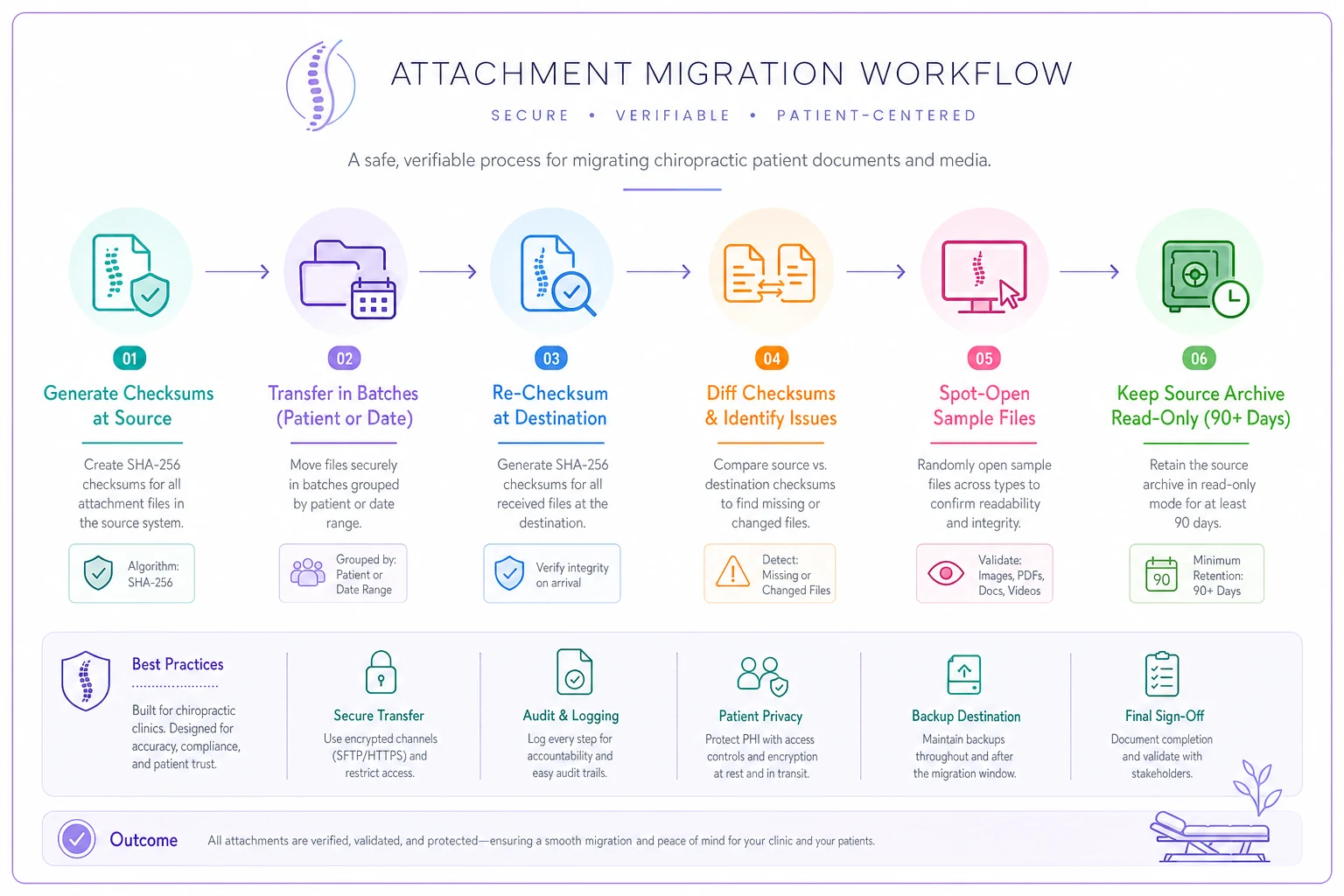
Budget the attachment migration as its own mini-project with explicit time for verification and spot‑checks.
5. Integration Test Scripts
Each gateway needs a deliberate round‑trip test, not just a "connected ✔" status light.
-
- EDI (claims/remits) Submit one real 837 claim to a low‑risk payer in a test batch. Confirm the 999/277CA acknowledgment comes back clean, then confirm the 835 remit posts. Don't call EDI "working" until a remit has fully round‑tripped.
-
- HL7 (lab/results interfaces) Send a test ADT and ORU message. Confirm the patient matches on the receiving side and the result files to the right chart.
-
- DICOM Push a test study from your imaging source to the new system's storage and viewer. Confirm it associates with the correct patient and opens cleanly.
-
- Credit‑card gateway Run a $1.00 live transaction, confirm it settles, then void or refund it. Then run a card‑on‑file charge against a re‑captured token. Old tokens won't work — that's the whole point of the test.
-
- SSO Log in as each role, confirm group‑to‑permission mapping, then test the deprovision path — disable a test user and confirm access dies immediately.
The deprovision test is the one everyone forgets, and it's the one that matters most from a security standpoint.
6. 30‑Day Monitoring Metrics Matrix
Go‑live isn't the finish line. The first 30 days are where migration problems surface as revenue problems. Watch these with explicit thresholds and actual alerts set up.
| Metric | Healthy Range | Alert Threshold | Check Cadence | Owner |
|---|---|---|---|---|
| Claim acceptance rate | 95%+ | <90% | Daily | Biller |
| Eligibility check failures | <5% | >10% | Daily | Front desk |
| ERA auto‑post rate | 85%+ | <70% | Daily | Biller |
| Days in A/R | Baseline ± a few days | +7 days vs. baseline | Weekly | Owner |
| Payment posting lag | Same‑day | >48 hrs | Daily | Biller |
| Attachment open failures | 0 | Any | Weekly | Clinical lead |
| SSO login failures | Near 0 | Spike vs. baseline | Daily | IT |
| Patient statement complaints | Low | Noticeable uptick | Weekly | Front desk |
The one to watch hardest is claim acceptance rate in the first two weeks. A payer ID that mapped wrong doesn't throw an error during migration — it throws rejections 10 days later, by which point you may have a couple hundred claims stuck in queue. Daily monitoring buys you those days back.
7. Rollback Playbook
Plan for the cutover that doesn't go cleanly. The decision to roll back should be made before go‑live, with a named trigger written down — something like "if claim acceptance drops below 80% and we can't root‑cause it within 24 hours, we roll back." Making that call in the moment, under pressure, is how clinics limp along on a broken system for weeks.
-
Freeze new data entry in the new system. Every minute it runs, you accumulate deltas that make the return harder.
-
Switch EDI endpoints back to the old clearinghouse connection. This is exactly why you don't cancel the old clearinghouse account on day one — keep it live for at least 30 days.
-
Capture the delta. Export everything entered in the new system since cutover — new patients, encounters, payments. This is the set you'll re‑key or re‑import into the old system.
-
Re‑point SSO so staff log back into the old platform.
-
Re‑enable the old system's write access (you set it read‑only, not decommissioned — this matters).
-
Reconcile the delta into the old system and run the same A/R and row‑count checks from Section 3 to confirm you're whole.
-
Communicate to staff and affected patients (templates below).
Clinics that roll back cleanly are the ones that kept the old system warm and read‑only. The ones that suffer are the ones who treated go‑live as a one‑way door.
8. RACI and Effort Estimates
Who does what, and roughly how long it takes. These ranges assume a reasonably clean source system — messy data stretches everything.
| Task | Small clinic (1–2 providers) | Medium clinic (3–6 providers) | Responsible | Accountable |
|---|---|---|---|---|
| Field mapping | 8–12 hrs | 20–30 hrs | Biller + vendor | Owner |
| Test matrix execution | 1–2 days | 3–5 days | Front desk + biller | Owner |
| Reconciliation | 4–8 hrs | 1–2 days | Biller | Owner |
| Attachment migration | 1–3 days | 3–7 days | IT / vendor | Owner |
| Integration testing | 1 day | 2–3 days | IT + biller | Owner |
| 30‑day monitoring | ~30 min/day | ~1 hr/day | Biller | Owner |
A small clinic should realistically plan for 2–3 focused weeks of part‑time work spread across staff. A medium clinic should plan for 4–6 weeks. The owner stays Accountable on every row — delegating accountability is how balances quietly drift.
9. Patient & Staff Communication Templates
Patient — statement change notice:
> "We've upgraded our practice management system. You may notice a new look on your statements and payment portal. Your balance and account history are unchanged. If anything looks off, call us at [number] — we'll fix it right away."
Patient — card on file re‑capture:
> "As part of a system update, we need to re‑enter the card you have on file for your payment plan. Please bring your card to your next visit or call us to update it over the phone. Your plan terms haven't changed."
Staff — go‑live heads‑up:
> "Go‑live is [date]. For the first two weeks, slow down and double‑check insurance and payment entries. If something looks wrong, flag it in [channel] immediately — don't work around it. Small errors caught on day one save hours later."
10. Short Remediation Workflows for Top Post‑Go‑Live Issues
Claims rejecting for payer ID: Pull the rejections, group by payer, cross‑check each against your payer mapping file from Section 1, correct the clearinghouse ID, and resubmit the batch. Then fix the master record so it doesn't keep recurring.
Payment plan billing the wrong amount: Run the remaining‑balance SQL from Section 3, pause auto‑billing on affected plans, correct the balances manually, confirm against the source export, then re‑enable.
Attachment won't open:
Check the checksum diff file. If the file's in missingorchanged.txt, re‑pull it from the read‑only source archive. If it's not there, it's a viewer or format issue — test whether the file opens outside the system first.
ERA posting to the wrong account: Stop auto‑posting, review the remit matching logic, manually post the misdirected payment, and correct the patient/account linkage before re‑enabling auto‑post.
SSO over‑permissioning: Audit the group‑to‑role mapping immediately. An over‑permissioned front‑desk login is a HIPAA exposure, not just a workflow inconvenience. Fix the mapping, then re‑run T‑08 across all roles.
If your source system is carrying more than a few years of messy data, or you've got heavy DICOM imaging, don't compress the timeline to hit an arbitrary date. The clinics that get burned are the ones who picked a go‑live date first and tried to make the data fit around it. Pick the date after reconciliation passes clean in staging.
And if nobody on your team can run a SQL query or generate a checksum, that's fine — but assign the reconciliation to your vendor or an outside resource explicitly, with the pass/fail criteria above written into the contract. "The vendor said it looked good" is not a reconciliation. Migration risk isn't abstract. It's a specific payer ID, a specific balance, a specific orphaned file. The whole point of a toolkit like this is to turn vague dread into a list of concrete things you can check off, prove, and — if you have to — safely undo. Keep the old system warm, reconcile to the cent, and watch the first 30 days like it's still go‑live. That's the difference between a migration you barely remember and one you're still cleaning up at tax time.
Ready to streamline your chiropractic clinic operations?
Join 1,200+ clinics using Spinesly to save time, reduce scheduling errors, and improve patient care experiences.