


Most chiropractic clinics don't buy the wrong software because they didn't do research. They buy the wrong software because they evaluated it like a general EHR — checking off scheduling, charting, and billing in the abstract — instead of pressure-testing it against how a chiropractic practice actually runs: high visit volume, repeat adjustments, short appointment slots, therapy codes stacked on manipulation codes, and a payer environment that loves to deny spinal CMT claims on technicalities.
This guide is built to fix that. It covers the features that actually matter for chiropractic workflows, realistic price ranges, a vendor evaluation checklist, a demo script you can read off during a sales call, red flags that should end a conversation, and a 30–90 day implementation timeline. Migration is its own beast — rather than rehash it here, there's a link below to the full data-migration and go-live checklist for when you reach that stage.
Start With the Visit, Not the Feature List
The mistake that keeps coming up: a clinic owner opens a comparison spreadsheet with 60 features and starts checking boxes. Every vendor checks almost every box. You end up comparing marketing language, not reality.
Flip it. Start from what happens in your clinic on a Tuesday at 10am with 18 patients on the schedule and two providers running. The software either makes that smooth or it fights you.
Time a routine adjustment documentation during a demo to verify actual documentation speed.
A typical established-patient adjustment is three to eight minutes of provider time. If documentation takes longer than the visit, the software has already failed. That single constraint eliminates a surprising number of "powerful" platforms that were clearly designed for 45-minute primary care appointments.
The Features That Actually Matter for Chiropractic
General EHR feature lists bury the chiropractic-specific stuff under things you'll never use. Here's what to focus on.
Never miss another patient appointment.
Spinesly helps you schedule, confirm, and manage every patient visit efficiently.
- Unified appointment management
- Automated patient reminders
- Staff and resource scheduling
No credit card required
SOAP Note Templates Built for Adjustments
You need templates that let you document a spinal manipulation in a few taps, not a blank note you rebuild from scratch every visit. Look specifically for:
-
Region-based templates (cervical, thoracic, lumbar, sacral, extremity) with segment-level selection
-
Carry-forward from the previous visit that still forces a review (more on this red flag later)
-
Built-in support for documenting treatment plan progression, not just the day's note
-
Fast entry for objective findings — ROM, palpation, orthopedic tests — without typing full sentences
The pattern that separates good chiropractic documentation tools from bad ones: good ones make the common visit fast and the complex visit possible. Bad ones make everything equally slow.
ICD-10 and CPT Support That Understands Chiropractic Coding
This is where generic platforms quietly cost you money. Chiropractic billing lives and dies on a narrow set of CPT codes (98940–98943 for CMT, plus therapy codes like 97012, 97014, 97110, 97140) paired with specific ICD-10 subluxation and region codes. The software should:
-
Suggest region-appropriate ICD-10 codes based on the note
-
Flag CPT/ICD mismatches that trigger denials before the claim goes out
-
Handle the "regions treated" logic that determines whether you bill 98940 vs 98941 vs 98942
-
Prompt for modifier use (like the AT modifier for active treatment) where relevant
If you want a deeper breakdown of the coding mistakes that cause denials, that's covered elsewhere on the blog. For buying purposes, just confirm the system actively helps prevent those mistakes instead of silently passing bad claims through.
Imaging Integration
Clinics that take or order x-rays need imaging to live inside the chart, not in a separate folder on a shared drive. Ask whether the platform supports DICOM viewing or integrates with your imaging equipment or PACS, and whether images attach cleanly to the visit note. A clinic doing its own x-rays has very different needs than one that refers out — be specific about yours during the demo.
Therapy and Modality Tracking
If you run adjunct therapies — traction, e-stim, ultrasound, therapeutic exercise — the software needs to track them per visit, tie them to the right CPT codes, and respect the time-based billing rules (the 8-minute rule for timed codes). Clinics that stack therapies on adjustments without proper tracking leak revenue every single day and never notice because each individual miss is small.
Revenue-Cycle Considerations Specific to Chiropractic
Billing is where chiropractic practices differ most from other outpatient clinics, and it's where the wrong software hurts most.
Chiropractic has a few structural realities baked in: visit caps per policy, frequent prior-auth requirements, a high rate of maintenance-care denials, and cash or membership plans running alongside insurance. Your software needs to handle all of this at once.
Here's what to verify on the revenue side:
-
Visit limit tracking. Can the system track remaining covered visits per patient per plan and warn the front desk before a patient blows through their cap?
-
Cash and membership plans. Many chiropractic clinics run monthly wellness memberships. The billing engine should handle recurring charges and mixed cash/insurance patients without workarounds.
-
Claim scrubbing. A built-in scrubber that catches chiropractic-specific errors before submission is worth more than any dashboard feature.
-
Denial management workflow. You want to see denials grouped by reason, not just a pile of rejected claims.
-
Clear A/R aging reports you can actually act on.
A realistic pattern: a two-provider clinic running roughly 320–380 visits a month with a 9–12% denial rate is leaving somewhere around $2k–$5k on the table monthly, mostly from preventable coding and documentation issues. Software that trims that denial rate by even a third pays for itself before you factor in the time saved.
Realistic Cost Ranges
Pricing in this space is intentionally murky. Vendors quote per-provider, per-location, or flat monthly, and the real number depends on how much of the revenue cycle you hand off.
| Tier | Typical Monthly Cost | What You Usually Get | Best Fit |
|---|---|---|---|
| Entry / solo | ~$100–$250 per provider | Scheduling, basic SOAP, charting, patient portal | Solo practitioner, cash-heavy practice |
| Mid-tier | ~$250–$500 per provider | Full EHR + integrated billing, claim scrubbing, reporting | 2–4 provider clinics, insurance-heavy |
| Full-service / RCM | ~5%–9% of collections | Software + outsourced billing and denial management | Clinics that don't want in-house billing |
| Enterprise / multi-location | Custom | Everything above + multi-site reporting, API access | Groups with 3+ locations |
Watch the extras. Onboarding and setup fees commonly run $500–$2,500. Data migration is often quoted separately. Clearinghouse fees, statement and postage fees, payment processing markups, and per-text messaging charges add up. A platform advertised at "$299/month" can land closer to $450–$600 once everything's switched on.
When a percentage-of-collections model makes sense: if billing is your weakest function and you'd otherwise need to hire someone, handing it off at 6–8% can be cheaper and cleaner than a salary plus software costs. When it's a bad idea: if you already have a solid biller and healthy collections, you're essentially paying a tax on revenue you were already capturing.
Vendor Evaluation Checklist
Run every serious contender through this before signing anything:
-
Purpose-built for chiropractic (not a general EHR with a "chiro module" bolted on)
-
Documentation speed verified on a real adjustment visit, timed
-
Chiropractic-aware coding and claim scrubbing demonstrated live
-
Imaging handling matches how your clinic actually uses x-rays
-
Therapy/modality tracking with correct time-based CPT logic
-
Visit-cap and prior-auth tracking at the front desk
-
Recurring membership/cash plan support
-
Transparent total pricing including all add-ons, in writing
-
Data export
can you get your data out later, in a usable format?
-
Contract term and cancellation terms (avoid multi-year lock-ins early)
-
Reference clinics of similar size and payer mix you can call
-
Support hours, response SLAs, and whether support is US-based or offshore
-
Uptime history and HIPAA/security posture (BAA available)
The data-export item deserves emphasis. Clinics obsess over getting in and forget they might need to get out. If a vendor can't clearly explain how you'd extract your full patient and billing history, treat that as a warning about the entire relationship.
A Demo Script You Can Actually Use
Sales demos are designed to show strengths and skip weaknesses. Take control. Hand the rep a scenario and make them drive the software through it live — don't let them run a pre-baked tour.
-
"An established patient is here for a lumbar and cervical adjustment plus e-stim. Walk me through creating today's SOAP note and generating the claim — start to finish, in real time."
-
"Now show me what happens when the CPT and ICD don't match. Does the system catch it before I submit?"
-
"This patient has 12 covered visits a year and has used 10. Where does my front desk see that?"
-
"Pull up a denied claim and show me your denial-management workflow."
-
"Show me the A/R aging report, then show me how I'd see denials grouped by reason."
-
"Attach an x-ray to this visit and let me view it from the chart."
-
"Run the recurring charge for a $99/month wellness membership patient who also has insurance for a separate issue."
-
"Export this patient's full record. Show me the file I'd get."
Time the first one. If documenting a routine adjustment and generating a clean claim takes more than a couple of minutes in the demo — where everything's optimized and the rep knows every shortcut — it'll be worse in your clinic on a busy Tuesday.
Red Flags That Should End the Conversation
Some of these are obvious. Some only show up if you're paying attention.
-
"We serve every specialty." Flexibility usually means nothing is tuned for chiropractic. The best chiropractic tools are narrow on purpose.
-
Carry-forward notes with no forced review. If the software clones yesterday's note with one tap and no checkpoint, it's a documentation-integrity liability. Cloned notes are a favorite audit target.
-
Evasiveness on total cost. If you can't get all-in pricing in writing, assume the real number is higher than quoted.
-
No comparable references. "We can't share clients" often means they don't have happy ones your size.
-
Vague data-export answers. Already mentioned, worth repeating.
-
Long contract lock-ins pushed early. Confident vendors let you prove fit first.
-
Support that only exists by email ticket. When billing breaks on the 1st of the month, you need a human fast.
-
A demo that avoids your scenarios. If the rep keeps steering back to the scripted tour, they're hiding something.
If the rep keeps steering back to the scripted tour, they're hiding something.
A Short Real Scenario
A three-provider clinic in a suburban market was running a general-purpose EHR their office manager had picked years earlier. Documentation on a routine adjustment took around five to six minutes because every note started half-blank, and providers were charting after hours. Their denial rate hovered near 11%, mostly CPT/ICD mismatches and missing modifiers that nobody caught until the EOB came back.
They switched to a chiropractic-specific platform with proper adjustment templates and a chiro-aware scrubber. Within about two months, routine-visit documentation dropped to under two minutes and after-hours charting mostly disappeared. Denials settled into the 6–7% range once the scrubber started flagging mismatches pre-submission. Nothing dramatic happened overnight — but across roughly 350 monthly visits, cutting denials and reclaiming provider time added up to a meaningful recovery, somewhere in the low thousands per month, plus providers actually going home on time. The point isn't the exact numbers. It's that the gains came from fit, not from the software being "better" in some abstract sense.
The 30–90 Day Implementation Timeline
Rushing go-live is how clinics end up with two weeks of unbillable chaos. Here's a realistic phased timeline.
Days 1–30: Setup and Configuration
-
Finalize the contract with all pricing and the BAA in writing
-
Assign an internal project owner (not "everyone," one person)
-
Configure providers, locations, schedule templates, and fee schedules
-
Build and customize your core SOAP templates for the visit types you run most
-
Set up payer connections and the clearinghouse
-
Begin planning the data migration (this is where the detailed checklist comes in)
Days 31–60: Testing and Training
-
Run test claims through the full cycle — submission to posting — before go-live
-
Train providers on documentation workflows using real visit scenarios
-
Train the front desk on scheduling, check-in, visit-cap tracking, and payment collection
-
Validate migrated data
spot-check patient records, balances, and histories for accuracy
-
Fix template and coding issues now, while there's no live pressure
Days 61–90: Go-Live and Stabilization
-
Go live mid-week and mid-month — never the 1st — so billing volume is lighter
-
Keep the old system in read-only access for reference during the first few weeks
-
Monitor the first batches of real claims closely for scrub errors and denials
-
Hold a short daily check-in the first week to catch friction fast
-
Review A/R and denial reports at the 30-day mark post-go-live and adjust
Don't collapse this into two weeks because a vendor says you can. The clinics that get burned are almost always the ones that skipped the testing phase.
Simple visual of the phased rollout:
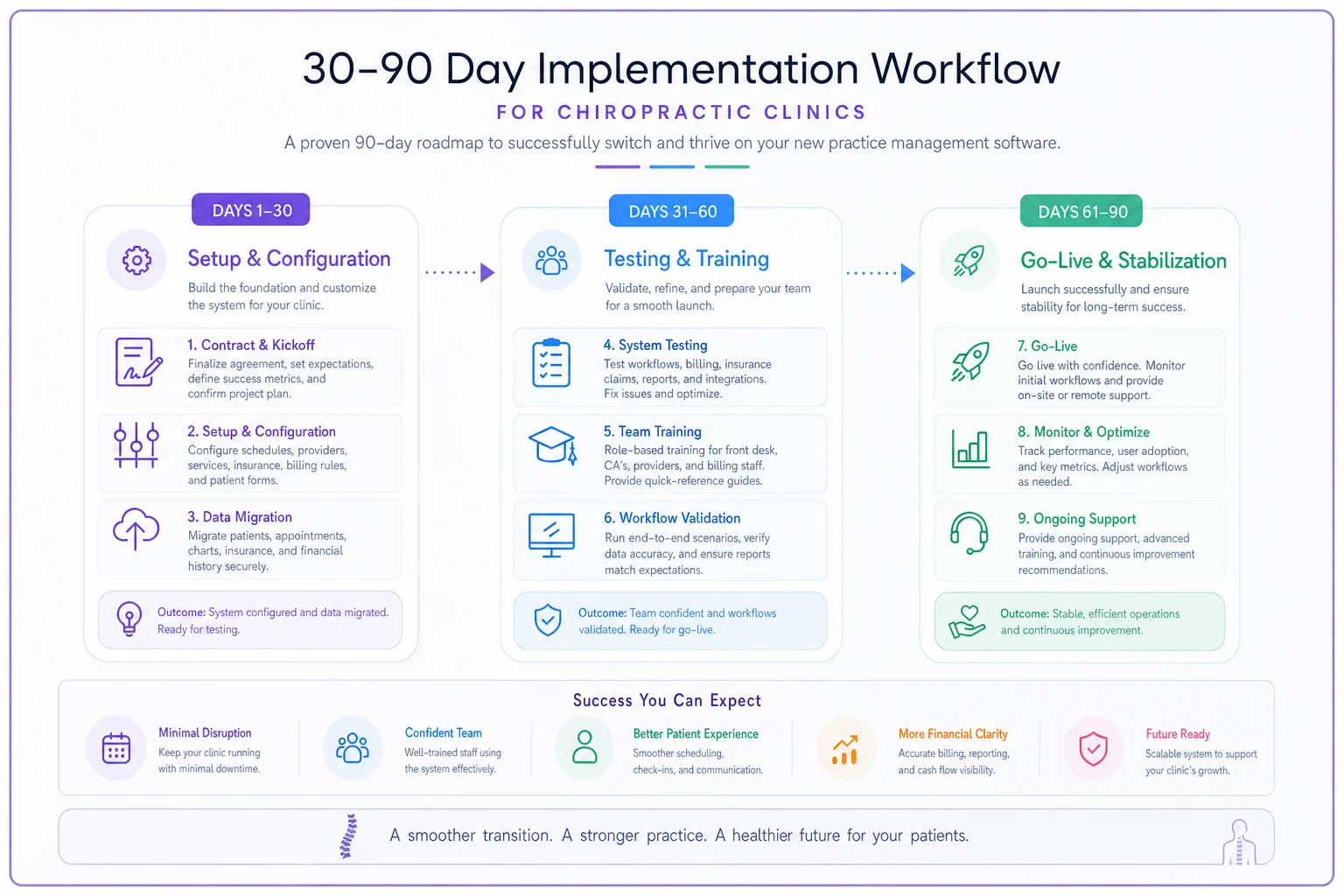
Keep the flow visual handy during planning meetings.
A Note on Migration
Moving your patient data, balances, and clinical history is the single riskiest part of switching platforms. Rather than summarize it here, follow the full process in our data-migration and go-live checklist for chiropractic clinics — it covers what to migrate, what to archive, how to validate, and how to sequence the cutover so you don't lose billable history.
One thing worth stating plainly: never assume a migration is complete until you've reconciled outstanding A/R and verified a sample of clinical records against the old system. "It imported" and "it imported correctly" are not the same thing.
When to Switch — and When to Stay Put
Not every frustrating platform needs replacing. Switching is genuinely disruptive, so be honest about whether the pain justifies it.
Switching makes sense when: documentation is eating provider hours, your denial rate is stuck because the system doesn't catch chiropractic coding errors, you can't track visit caps or memberships without spreadsheets, or support has become unreliable.
Staying put makes more sense when: the core problems are workflow or training issues that a better-configured version of your current system would solve. New software won't fix a process your team hasn't actually defined. Sometimes the honest answer is that the tool is fine and the SOPs are the problem.
Who should be especially careful: solo cash-based practices with light billing needs. The full-featured insurance-heavy platforms are overkill, and a leaner tool will serve you better and cost you less.
Bottom Line
The right chiropractic practice management software isn't the one with the longest feature list — it's the one that makes a routine adjustment fast to document, catches coding errors before they become denials, and respects the specific billing realities of chiropractic care. Evaluate against your actual Tuesday-morning workflow, pressure-test every demo with your own scenarios, get total pricing in writing, and give yourself a real 30–90 day runway to implement. Do that, and the software becomes something you stop thinking about — which, for operational tools, is exactly the goal.
Ready to streamline your chiropractic clinic operations?
Join 1,200+ clinics using Spinesly to save time, reduce scheduling errors, and improve patient care experiences.