


Most clinics don't lose data during a vendor switch. They lose context. The appointment records come over fine. The patient demographics look right. Then three weeks later someone pulls a payer mix report and the numbers are off by 11%, nobody can explain why, and now you're arguing with two vendors who both swear their side is correct.
That's the part nobody warns you about. The export isn't the risky step. The risk lives in how fields map to each other, which records are "true," and whether your old reports and new reports agree when you run them side by side. Get that wrong and you'll spend the next quarter defending numbers instead of running the clinic.
This piece is about building an export checklist organized by field priority rather than by table — because that's the order that actually protects your money and your reporting. If you've already read the broader Switch Practice Management Safely: A Data‑Migration & Go‑Live Checklist, treat this as the deeper dive on the export and reconciliation layer specifically.
Why "export everything" is the wrong instinct
When a clinic owner hears "data migration," the gut reaction is to export every table the old system will give them and push it all into the new one. Feels safe. More data, fewer regrets, right?
In practice it creates two problems. First, you drown the validation effort. If every field is equally important, nothing is — and your team ends up spot-checking random records instead of guarding the fields that actually drive revenue. Second, you import garbage. Old systems accumulate junk: duplicate patient records, dead insurance plans from 2014, appointment types nobody uses anymore, orphaned ledger entries. Drag all of it over and you've contaminated a clean system on day one.
The better frame is field-first prioritization. Before you export anything, rank fields by what breaks if they're wrong. A misspelled middle name on a patient chart is annoying. A dropped adjustment code on an outstanding claim is money walking out the door. Those two things should never get the same level of attention, but in a dump-everything migration, they do.
Golden records: deciding what "true" means before you move it
This is the concept that saves clinics the most pain, and it almost never shows up in vendor onboarding docs.
Never miss another patient appointment.
Spinesly helps you schedule, confirm, and manage every patient visit efficiently.
- Unified appointment management
- Automated patient reminders
- Staff and resource scheduling
No credit card required
A golden record is the single, authoritative version of an entity — a patient, a payer, a provider, a fee schedule — that you've decided is correct. The reason this matters: most clinics running a system for five-plus years have the same patient entered two or three times. Different spelling. Old phone number on one, new insurance on another. Visit history split across both.
Export without resolving these first and the new system inherits the mess. Your "active patient count" gets inflated, recall campaigns double-text people, and retention reporting is quietly wrong.
How to establish golden records before export
-
Pull a duplicate-detection report on patients using fuzzy matching — name + DOB + phone, not exact match. Exact-match misses the "Robert" vs "Bob" and "123 Main St" vs "123 Main Street" cases, which are the ones that actually duplicate.
-
Decide a survivorship rule. When two records conflict, which wins? The common rule: most recent financial activity wins for billing fields, most recent clinical encounter wins for demographics. Write this down. You'll reference it constantly.
-
Flag merge candidates for human review when financial history exists on both records. Never auto-merge a patient who has an open balance on one profile and a credit on another — that's how you create ledger disputes.
-
Freeze the golden record set before export. The list of "these are the real patients, these are the duplicates we're retiring" becomes the master map everything else references.
Do the same exercise for payers and fee schedules. One clinic I worked with had over 40 insurance plans in their old system. After cleanup, 19 were actually in use. The other half were duplicates, expired plans, or test entries. Migrating all 40 would have made every payer-mix report useless on the new platform.
The field-first export checklist
Here's the prioritization order that holds up across clinics. Work top-down. Don't touch tier 3 until tier 1 reconciles cleanly.
| Priority | Field group | Why it ranks here | What breaks if wrong |
|---|---|---|---|
| Tier 1 | Open A/R, claim status, adjustments, patient balances, payment history | Directly maps to money you're owed or owe | Lost revenue, double-billing, refund errors |
| Tier 1 | Active insurance + eligibility, payer IDs, fee schedules | Drives claim generation on day one | Denials, rejected claims, wrong patient responsibility |
| Tier 2 | Patient demographics, contact info, consent flags | Needed for operations and compliance | Failed reminders, HIPAA gaps, recall misfires |
| Tier 2 | Future appointments, recurring care plans, waitlist | Keeps the schedule intact at go-live | Empty chairs, lost bookings, confused patients |
| Tier 3 | Historical appointments, clinical notes, imaging links | Reference and continuity of care | Harder lookups, but no immediate revenue hit |
| Tier 4 | Inactive patients, closed claims >2 yrs, archived data | Rarely touched | Mostly storage clutter |
The useful insight here isn't the specific rows — it's that reconciliation effort should mirror this tiering exactly. If your team has 40 hours for validation, roughly 25 of them belong to Tier 1. Most clinics invert this, spending days confirming that old clinical notes came across perfectly while nobody checks whether the open A/R balance total matches between systems. Then the first statement run goes out wrong.
Validation scripts and the parallel run
A parallel run means both systems hold the data at the same time and you prove they agree before you kill the old one. This is where theory meets reality, and it's the step clinics skip when they're behind schedule — then regret for months.
What a real validation check looks like
-
Record counts. Active patients in old system vs new. Open claims old vs new. If old says 1,420 active patients and new says 1,383, you have 37 records to find before go-live, not after.
-
Financial totals. Total open A/R. Sum of patient balances. Sum of insurance balances. These should tie to the penny on Tier 1 or you stop and investigate. A $340 variance isn't "close enough" — it's a symptom of a mapping error that's probably affecting a whole category of records.
-
Distribution checks. This one catches the subtle failures. Count claims by payer. Count appointments by type. Count patients by status. If the shape of the data shifts — old system shows 22% Medicare, new shows 31% — a status or payer field got mismapped even though the total count matches.
That distribution check is the one people forget, and it's the one that silently corrupts reporting. Totals can match while the categories underneath them are completely scrambled.
Reconciliation rules: deciding what counts as a pass
-
Tier 1 financial fields zero tolerance. Must match exactly or go-live is blocked.
-
Tier 1 counts (claims, active patients) variance must be explained and documented, not just within some percentage. Every missing record gets a reason.
-
Tier 2 demographics small tolerance is acceptable (a few formatting differences in phone/address), but anything affecting reminders or consent gets fixed.
-
Tier 3/4 historical sampling is fine. Pull 50 random records, confirm they look right, move on.
The discipline that matters: a blocked go-live is a successful validation, not a failure. Clinics that treat "we found problems" as bad news push through anyway. Clinics that treat it as the system working correctly delay a week and save themselves a billing nightmare.
Treat a blocked go-live as a successful validation, not a failure.
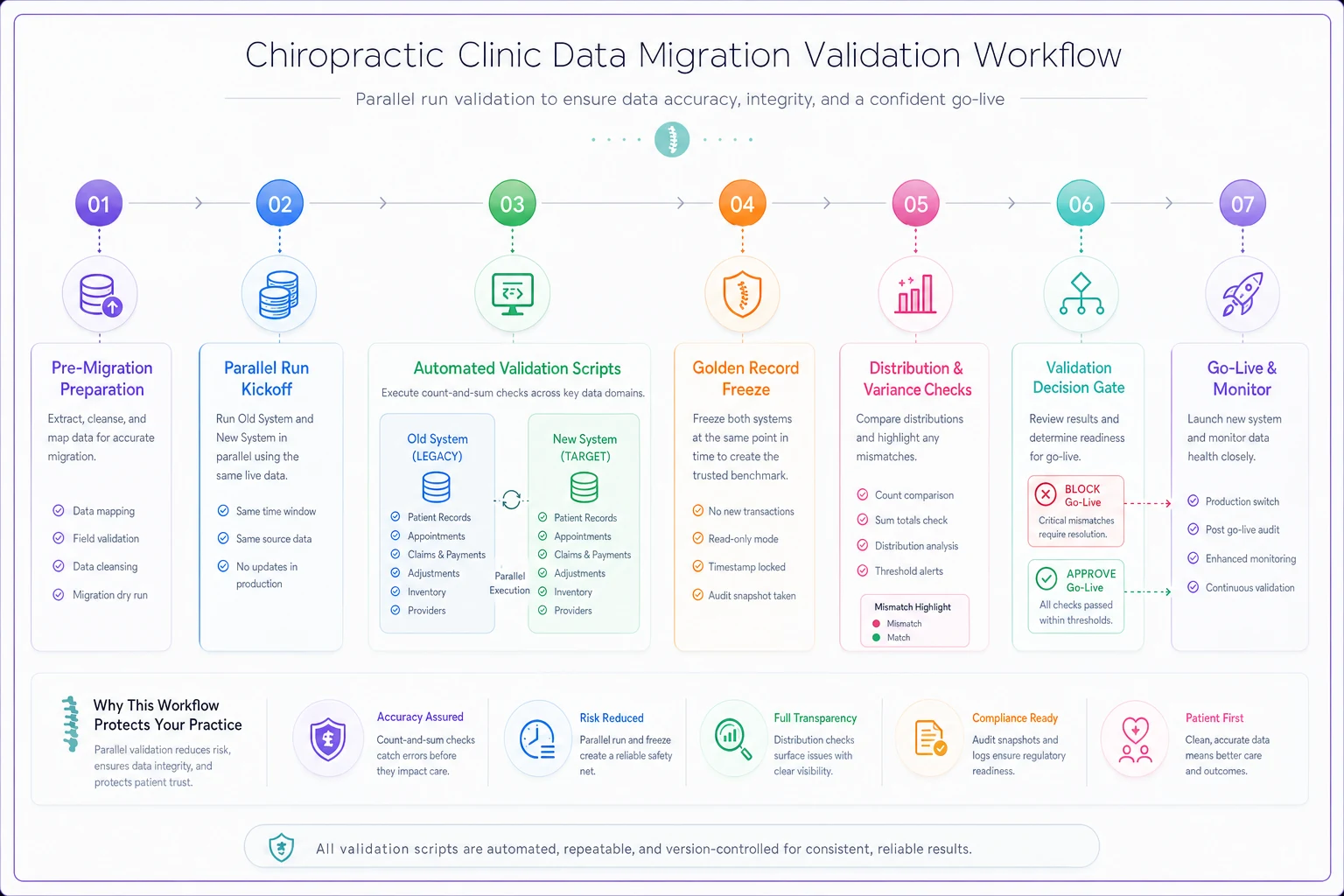
The diagram shows the parallel-run validation workflow in a single view so teams can follow each reconciliation step.
The protect-your-reporting layer
This is the part that gets lost. You can migrate every record perfectly and still destroy your reporting continuity — because the definitions changed.
Your old system might count an "active patient" as anyone seen in 18 months. The new one defaults to 12. Same data, different denominator, and suddenly your retention metrics look like they fell off a cliff when nothing actually changed. If you track the KPIs that actually move the needle, you need those definitions to carry over or your trend lines break at the migration date and every historical comparison becomes meaningless.
Before go-live, write down the exact definition behind each KPI you report on — active patient window, visit counting method, no-show definition, collection rate formula — and confirm the new system computes them the same way. Where it can't, document the break point. That way, six months from now when a number looks weird, you know it's a definitional artifact and not a real decline.
A realistic before/after
A mid-size clinic — two providers, roughly 330–360 visits a week — switched platforms after years on a legacy system. First attempt, no field-first plan. They exported everything, imported everything, went live.
Within the first billing cycle: duplicate statements went to around 60 patients because duplicate records weren't resolved, three claims double-submitted, and the payer mix report was unusable because expired plans came across as active. Staff spent an estimated 30–40 hours over two weeks cleaning up and fielding patient calls. Hard to put an exact dollar figure on it, but the staff time alone ran into the low thousands, plus the trust hit from billing patients twice.
On the redo — they didn't re-migrate, they corrected in place — the fix was golden records plus Tier 1 reconciliation. Resolved duplicates down to a clean active list, validated open A/R to the dollar, and ran the distribution check that caught the expired-plan problem. The payer mix report lined up with the prior system within about 1%, which was explainable. No more double statements. The whole corrective effort took a focused week, mostly because they finally prioritized the right fields instead of all of them.
The lesson wasn't "work harder." It was "validate in the right order."
When this level of rigor makes sense — and when it doesn't
Do the full field-first, parallel-run approach when: you have meaningful open A/R, you've run the old system for several years (so duplicates and dead data have accumulated), or your payer mix and retention reporting actually drive decisions. The more your money and your reporting depend on clean data, the more this pays off.
You can scale it down when: you're a newer clinic with a small, clean record set, minimal outstanding A/R, and simple payer relationships. Running a formal parallel reconciliation on 300 clean records with no open claims is overkill. Spot-check Tier 1, confirm totals, move on.
Who should not try to DIY the validation scripts: owners with zero technical help and no one on staff who can run basic count-and-sum queries. The checklist thinking still applies — prioritize fields, resolve golden records, check totals manually — but the SQL-level distribution checks need someone comfortable with data, whether that's a staff member, the vendor's migration team, or an outside hand. Guessing here is worse than asking.
Where the right tooling quietly helps
None of this requires fancy software, but a few things get easier with the right platform. Modern practice management systems with built-in migration support can run duplicate detection and surface merge candidates automatically instead of you eyeballing a spreadsheet. Some will flag field-mapping mismatches during import rather than letting them pass silently. Platforms that keep reporting definitions explicit — where you can actually see how "active patient" is calculated — make the KPI continuity problem solvable instead of a surprise.
The value isn't automation for its own sake. The tedious, error-prone parts — matching duplicates, comparing record counts, catching distribution drift — are exactly the parts humans do badly at 11pm under deadline pressure. When the system handles the mechanical comparisons, your team can focus on the judgment calls that actually need a human: which duplicate wins, whether a variance is acceptable, whether you're ready to go live.
The bottom line on export order
Clinics that switch vendors cleanly aren't the ones with the best data or the newest system. They're the ones who decided, before exporting a single record, which fields were allowed to be wrong and which weren't — and then spent their validation time accordingly.
Export in priority order. Resolve your golden records first. Run both systems in parallel long enough to prove the numbers agree where it counts. Set your reconciliation tolerances in writing before emotion and deadlines creep in. And protect your reporting definitions so your history doesn't break the day you flip the switch.
Do that, and the vendor switch becomes a non-event — which, when you're the one explaining the numbers to your accountant, is exactly what you want it to be.
Ready to streamline your chiropractic clinic operations?
Join 1,200+ clinics using Spinesly to save time, reduce scheduling errors, and improve patient care experiences.